YAML Validator
Paste YAML or open a file to check its syntax, with the exact line and column of each problem.
This YAML validator is a free online YAML validator that checks whether YAML text is valid and reports each error with its line and column. Paste your YAML into the text box or open a .yml, .yaml or .txt file, and the page shows Valid YAML or Invalid YAML. It runs in your browser, needs no sign-up, and sends nothing to a server.
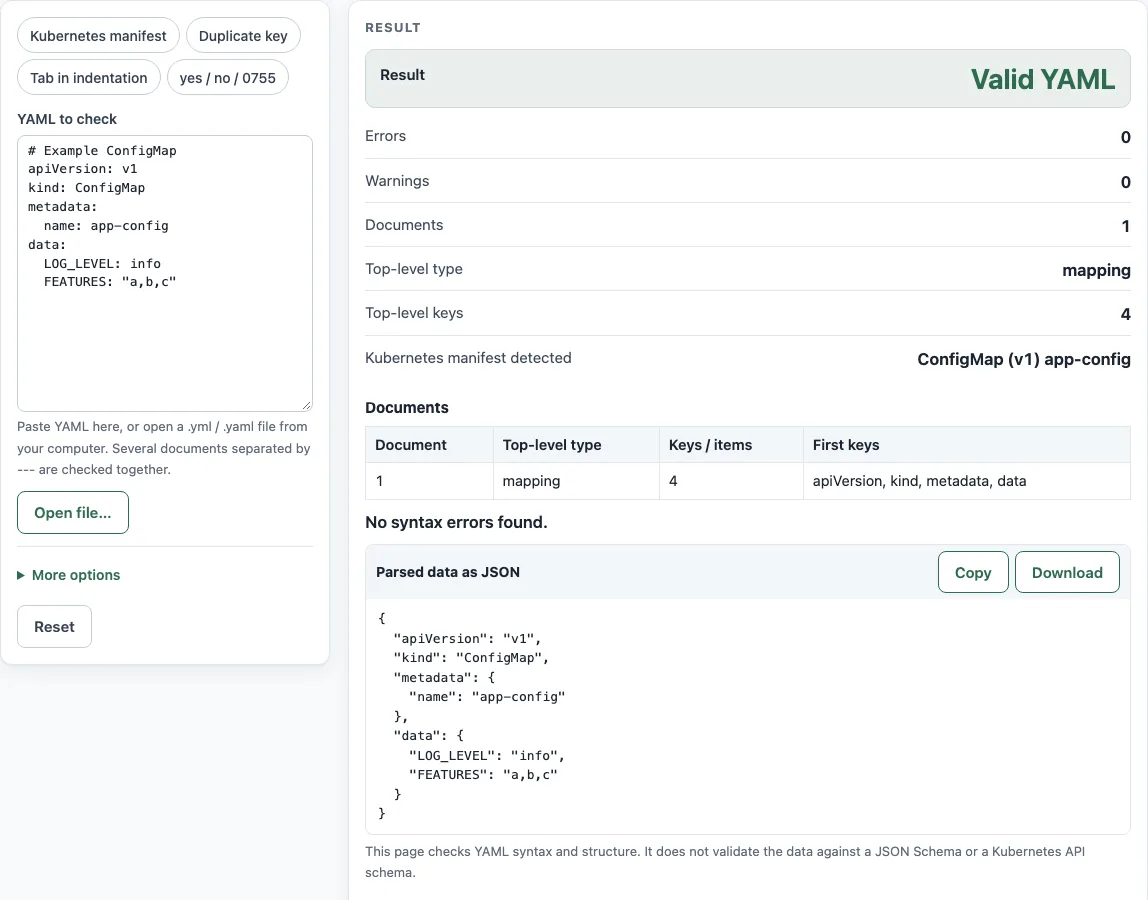
Use it as a YAML checker before you commit a config file or apply a Kubernetes manifest. The page also shows the number of documents, the top-level type, the top-level keys and whether a document is a Kubernetes manifest. After it passes, test the file with the program that will read it.
How to use the YAML validator
To validate YAML online, paste the text or load a file, then read the Result row. Valid YAML means the text parsed without errors. Invalid YAML means at least one error needs fixing.
- Paste your YAML into the YAML to check box. Or click Open file… and choose a .yml, .yaml or .txt file of up to 2 MB. The file loads into the text box.
- Leave YAML version on “YAML 1.2 (default)”. Under More options, choose “YAML 1.1” only if a YAML 1.1 parser will read the file.
- Read Result. If it says Valid YAML, check Documents, Top-level type and Top-level keys against what you expect.
- If it says Invalid YAML, read the issue list. Each entry gives Line L, column C, the message, the source line and a
^under the problem column. - Fix the line in your editor, paste the text again and repeat until Errors shows 0.
- Check Warnings. For valid YAML, use Copy or Download
data.jsonunder Parsed data as JSON if you need the parsed data.
The presets Kubernetes manifest, Duplicate key, Tab in indentation and yes / no / 0755 load sample text, which helps you see how each error appears. An empty box shows “Paste some YAML first.” A file with only comments is valid with 0 documents.
Why does my YAML fail with a tab?
YAML does not allow tab characters in indentation, so a line indented with a tab produces an error (TAB_AS_INDENT). The YAML 1.2.2 specification, section 6.1, says “tab characters must not be used in indentation, since different systems treat tabs differently.” Indentation defines the structure of YAML, so every parser must read it the same way.
The error points to the line and column of the tab. Replace each tab used for indentation with spaces, and use the same number of spaces for each level, usually two.
Why is no or yes flagged?
The word no is flagged because YAML 1.1 and YAML 1.2 read it differently. The YAML 1.1 boolean type includes y, yes, n, no, on and off, so a YAML 1.1 parser turns country: no into false. The YAML 1.2 core schema accepts only true and false as booleans, so no stays the string “no”.
In YAML 1.2 mode, this tool shows a warning for unquoted values such as no, yes, on and off, and for keys such as on:. A warning does not make the file invalid. The same applies to mode: 0755, which is decimal 755 in YAML 1.2 but octal 493 in YAML 1.1, and to 22:22, which is a string in YAML 1.2 but the base-60 number 1342 in YAML 1.1.
To avoid the difference, quote the value, for example country: "no" or port: "22:22". A quoted value is a string in every YAML version.
What usually makes YAML invalid?
Most errors come from a few causes. A quote or a bracket that is opened but never closed, such as name: "web or ports: [80, 443, makes the parser read past the end of the line. A key indented by a different number of spaces than its siblings no longer belongs to the same mapping. A key repeated in one mapping is an error under YAML 1.2.2. A tab used for indentation is an error too. Each of these is reported with the line and column where the parser noticed it, which can be a line or two after the real mistake, so look at the line above the caret as well.
Sources (checked 13 October 2026): YAML spec · Docker docs · yaml library docs
Worked examples
| Input | Result |
|---|---|
| apiVersion: v1 | Valid, 1 document(s), 0 warning(s) |
| name: web | Invalid, 1 error(s), first on line 2 |
| services: | Invalid, 1 error(s), first on line 3 |
| enabled: yes | Valid, 1 document(s), 3 warning(s) |
| a: 1 | Valid, 3 document(s), 1 warning(s) |
Calculated by the tool above; open it with the same values to see each step.
Frequently asked questions
Does it validate against a schema (yaml schema validation)?
No. The page checks YAML syntax and structure only. It does not validate against a JSON Schema or a Kubernetes API schema, and it does not check whether keys or values mean anything to a particular program. Use a schema-aware tool for that.
What does “Map keys must be unique” mean?
It means the same key appears twice in one mapping. YAML 1.2.2 section 3.2.1.1 requires each key in a mapping to be unique. For name: web followed by name: db at the same level, the error points to line 2, column 1. Rename or remove one of the keys.
Is my YAML uploaded?
No. The text is checked in your browser, and a file opened with Open file… never leaves the browser.
Can it check a file with several documents?
Yes. Documents separated by --- are checked together and counted in Documents. The text a: 1, ---, b: 2, ---, - x, - y gives 3 documents, a top-level type of “mapping, sequence” and 2 top-level keys. An explicit empty document, such as a trailing ---, counts as a document of type null.
Can I validate a Kubernetes manifest with it?
Yes, for syntax. A document with string apiVersion and kind is shown under Kubernetes manifest detected with its kind, apiVersion and metadata.name. The page checks nothing else about the object, so a valid result does not mean the manifest will apply to your cluster. Test it with your usual Kubernetes tooling.
Which YAML version should I pick?
Pick YAML 1.2, the default, for most files. Pick YAML 1.1 only when the file will be read by a YAML 1.1 parser. In that mode yes becomes true, 0755 becomes 493, and 22:22 becomes 1342, and the boolean and octal warnings are not shown.
Related tools
- Docker Compose example generator: use it to start from a sample Compose file, which is YAML, then check your edits here.
- systemd service generator: use it to create a service unit file when you need a systemd configuration rather than YAML.
- systemd timer generator: use it to write a timer unit file that schedules a service.
- Crontab syntax explainer: use it to understand the fields of a cron line before you write one.
- Cron expression generator: use it to build a cron expression from a schedule.