YAML Multiline String
Type your text, pick a style, and get the YAML block plus the string it parses to.
| or >) or a double-quoted line with \n. Enter a key and your text, choose a style, and the tool shows the YAML, the block header, and the exact string a program will receive. Everything runs in your browser, and nothing you type is sent anywhere. Use it when a config file needs a value that spans several lines, such as a script, a message or a description. The result is checked by parsing the YAML back, so you see the exact string a YAML 1.2 parser reads, including whether the final newline is kept.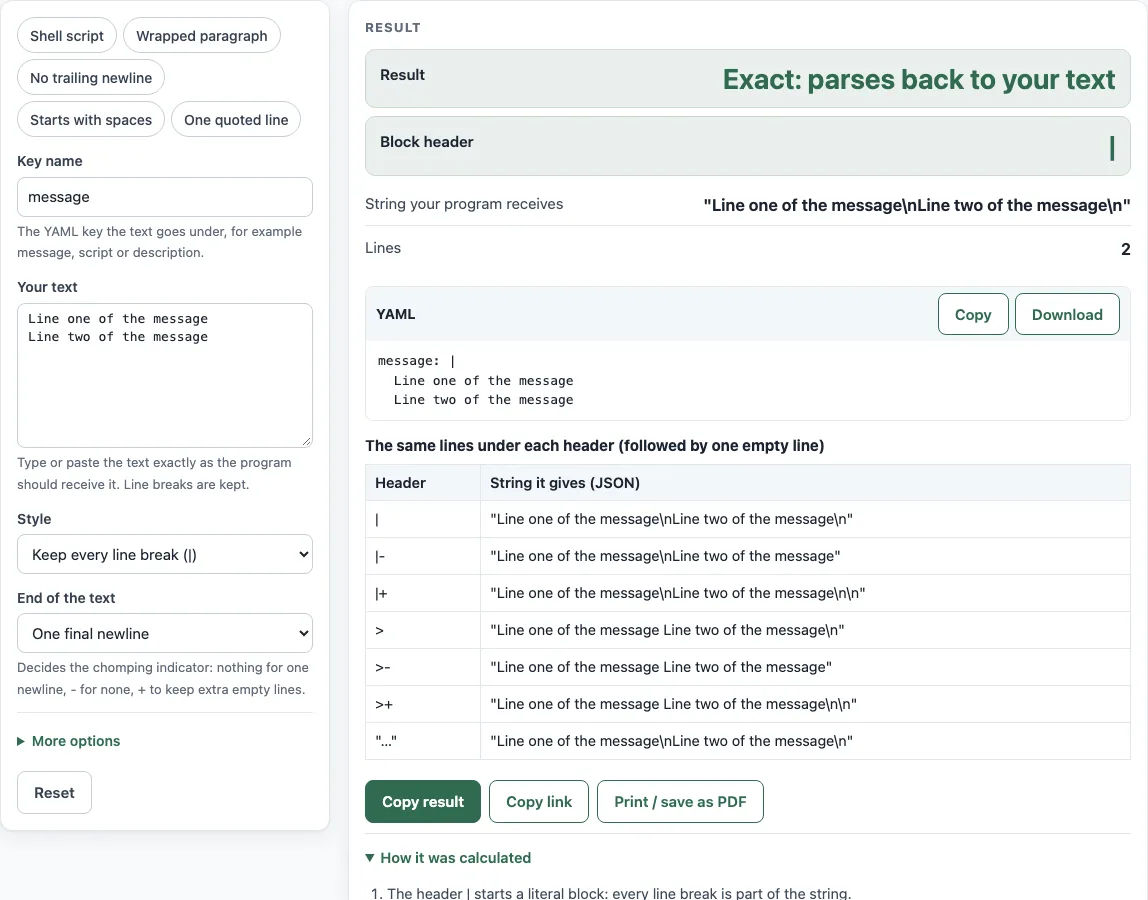
How to use the YAML multiline string tool
- Type a Key name for the YAML entry, such as
message. The tool writes the key plainly when it uses only letters, digits, underscores, dashes, or dots. Otherwise it adds double quotes. - Paste or type your lines into Your text. Each line break you type becomes a line in the output.
- Choose a Style: Keep every line break (|), Fold lines into one paragraph (>), or One quoted line with \n ("…").
- Set End of the text to decide the final newline: One final newline, No final newline, or Exactly as typed.
- Open More options and pick an Indent of 2 or 4 spaces.
- Check the Result, Block header, and String your program receives. The YAML code block shows the finished entry. Select Download to save it as
multiline.yaml. - Read the table The same lines under each header to compare the values produced by
|,|-,|+,>,>-,>+, and the quoted form.
If your text starts with spaces, select the Starts with spaces preset to see how the tool adds an indent digit. The Shell script, Wrapped paragraph, No trailing newline, and One quoted line presets load sample text for those cases. Read any warnings the tool shows before you copy the output.
How do I write a multiline string in YAML?
Use a block scalar. Write the key, a colon, then | or > on the same line. Indent every text line more than the key. YAML reads those lines as one value until the indentation returns to the key’s level. For example, message: | followed by two indented lines gives a string with both lines and their line breaks.
What is the difference between | and > in YAML?
The literal style | keeps every line break as part of the string. The folded style > replaces each line break with a space, so the lines join into one paragraph. Folding has exceptions: a line that starts with spaces is not folded, and the line breaks around it stay. An empty line in folded text becomes a line break.
What do |- and |+ mean?
These are chomping indicators that control the final line break and any empty lines at the end. The minus sign - (strip) removes the final line break and trailing empty lines. The plus sign + (keep) keeps the final line break and all trailing empty lines. With no sign (clip), YAML keeps one final line break and drops extra trailing empty lines. For the line text, |- gives text, | gives text\n, and |+ gives text\n.
How do I keep or remove the final newline?
Set End of the text. One final newline gives no sign, which is clip. No final newline gives -. Exactly as typed counts the newlines at the end of your text: none gives -, one gives clip, and two or more give + with the extra empty lines written after the text. Without the tool, change the header yourself: |- removes the final newline and |+ keeps it.
How do I put \n in a YAML string?
Use the quoted style, One quoted line with \n. Inside double quotes, YAML reads \n as a line feed. Inside a block scalar, \n is only two characters, a backslash and an n, and does not start a new line. Escapes such as \n work only in double-quoted strings.
Why does my text start with spaces and the block fail?
Without an indicator, YAML takes the content indent from the leading spaces of the first non-empty line. If your text itself starts with spaces, those spaces are read as indentation and are lost, and a later line that is indented less than the first one is an error. An indentation indicator fixes this: it is a digit written in the header, before any sign, such as |2 or |2-. The tool writes the indent width as that digit when your first line starts with spaces.
Source (checked 18 October 2026): YAML 1.2.2 specification, sections 5.7, 8.1.1 to 8.1.3
Worked examples
| Input | Result |
|---|---|
| "Line one of the message\nLine two of the message\n" (literal) | | → "Line one of the message\nLine two of the message\n" |
| "Line one of the message\nLine two of the message\n" (literal) | |- → "Line one of the message\nLine two of the message" |
| "A paragraph that is wrapped\nacross two lines.\n\nSecond paragraph.\n" (folded) | > → "A paragraph that is wrapped across two lines.\nSecond paragraph.\n" |
| "a\nb\n\n" (literal) | |+ → "a\nb\n\n" |
| "Line one of the message\nLine two of the message\n" (double) | " → "Line one of the message\nLine two of the message\n" |
Calculated by the tool above; open it with the same values to see each step.
Frequently asked questions
Does the folded style keep my paragraphs?
Yes. An empty line between two blocks of text stays a line break in the string, so separate paragraphs with an empty line. A single line break between two lines becomes a space.
Does the tool send my text to a server?
No. The tool runs entirely in your browser, and your text stays on your device.
What happens if my text has Windows line endings?
The tool turns Windows line endings into plain newlines and shows a notice. Your output then uses ordinary line breaks.
Why is the folded string different from the text I typed?
Folded style is designed to join lines. A single line break between two lines becomes a space, while an empty line stays a line break. The tool shows the resulting string under String your program receives.
Why does the key sometimes have double quotes?
The tool wraps the key in double quotes when it contains characters other than letters, digits, underscores, dashes, or dots, or when it does not start with a letter or underscore.
Why can’t I use a control character in a block scalar?
A control character other than tab and newline cannot appear in a block scalar here. The tool asks you to choose the quoted style instead.
Related tools
- YAML validator — Check that a whole YAML file parses and see errors with line and column.
- YAML formatter — Re-indent a YAML file, set quote style and keep comments.
- Docker Compose ports — Check port mappings and write a ports list in short or long syntax.
- Docker Compose example generator — Pick services and get a compose.yaml with an .env file and commands.
- docker run to Compose converter — Turn a docker run command into a compose.yaml service.
- Kubernetes CronJob generator — Fill in the schedule and container to get a CronJob manifest.
- Docker Compose commands — Build a docker compose command and look up the options.