systemd Service File Generator
Fill in the command and options to get a systemd service unit file and the commands to install it.
.service unit file for systemd, the service manager used by many Linux distributions. Fill in the form and you get the unit file, the commands to install and check it, and an example systemctl edit drop-in. The tool runs entirely in your browser, is free, and needs no sign-up. Use it to turn a program, such as a Node.js app, a Python web app, a one-off job, or a forking daemon, into a service that can start at boot and restart after a failure. Treat the output as a starting point and check it with the commands on the page before you rely on it.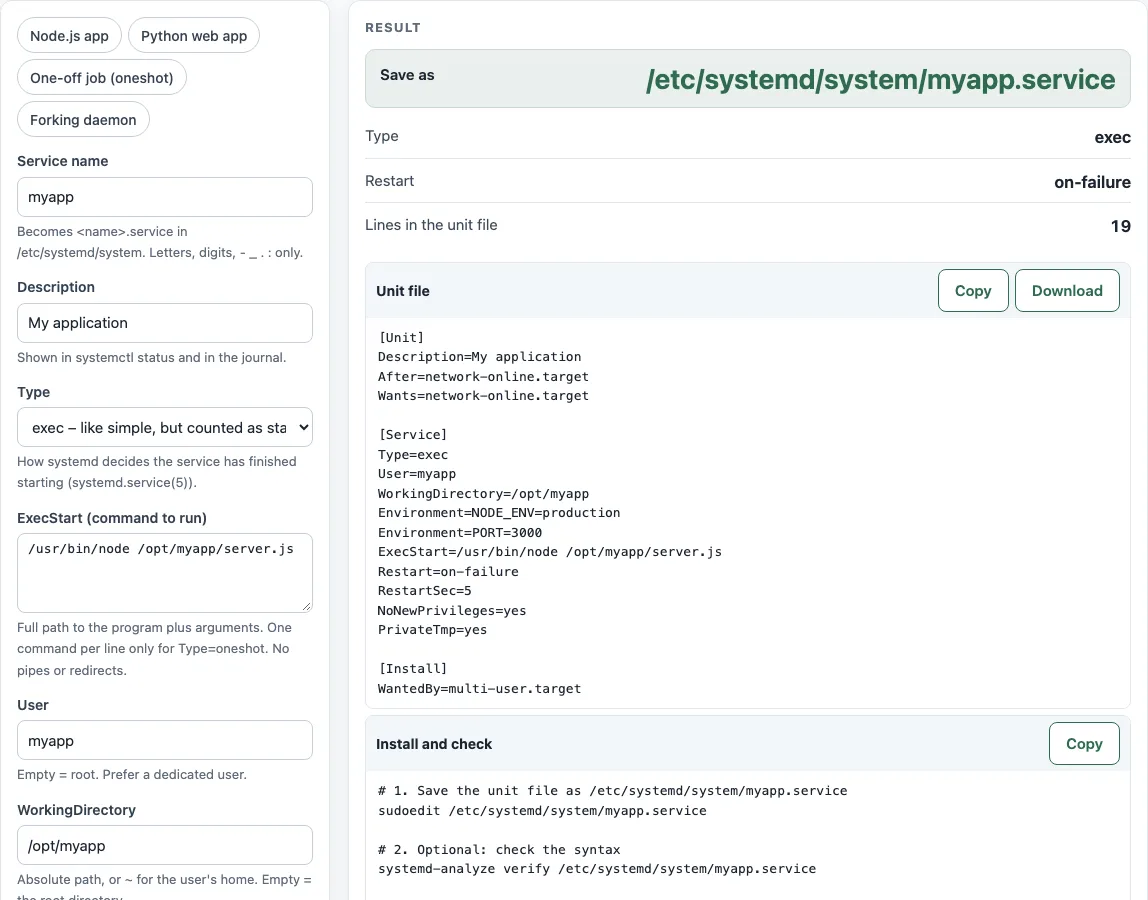
How to use the systemd service generator
- Choose a preset (Node.js app, Python web app, One-off job (oneshot), or Forking daemon) if one fits, or fill in the fields yourself.
- Enter the Service name. Use only letters, digits,
:,-,_,.and\. - Enter a Description and the ExecStart (command to run). Use the absolute path to the program.
- Set Type and check the table of Type values to pick the right one.
- Set User and WorkingDirectory, then add Environment variables, one
NAME=valueper line. - Set Restart and RestartSec.
- Choose a Network option.
- Optionally open the more options (Group, EnvironmentFile, ExecStartPre, ExecReload, ExecStop, PIDFile, After=, Wants=, WantedBy) and the hardening switches (NoNewPrivileges=yes, PrivateTmp=yes, ProtectSystem, ProtectHome, ReadWritePaths).
- Read the outputs: Save as, Type, Restart and Lines in the unit file.
- Copy or download the Unit file block, then run the commands in Install and check.
Use the Change it later: systemctl edit block when you need to adjust a running setup without changing the original file.
The page checks the form as you type. Errors, such as a relative ExecStart path or Restart=always on a oneshot unit, stop the file from being written until you fix them; warnings, such as a service that would run as root or a RestartSec below 2 seconds, are listed under the result with the reason from the man page. Each hardening switch has a one-line note in the list below the unit file, so you can see what it blocks before you turn it on.
How do I create a systemd service?
Save a unit file named <name>.service in /etc/systemd/system/, then load it and start it. Run sudo systemctl daemon-reload and then sudo systemctl enable --now <name>. There is no systemctl create service command; you write the file and reload systemd.
Where do I put the unit file?
Put your own service files in /etc/systemd/system/. The tool writes to that path. Check the file with systemd-analyze verify <file> before you load it.
What is the difference between simple and exec?
Type=simple counts the service as started right after fork(), so it reports success even if the binary is missing. Type=exec counts it as started only after the binary has executed, so systemctl start fails if the program cannot run. systemd.service(5) recommends Type=exec for long-running services. forking expects the parent to exit when start-up is done, and PIDFile= is recommended for it. oneshot is up only after the process exits.
How do I restart a service automatically?
Set Restart= to on-failure or always, and set RestartSec= to the delay between attempts. The default for RestartSec= is 100 ms, but systemd’s default start limit allows 5 starts in 10 seconds (systemd-system.conf(5)), so a value below 2 seconds triggers a warning. A oneshot unit cannot use always or on-success.
How do I pass environment variables?
Add one Environment=NAME=value line for each variable. Wrap a value with spaces or quotes as Environment="NAME=value with spaces". Variable names use ASCII letters, digits and underscores, and cannot start with a digit. For many values, use EnvironmentFile= with an absolute path, optionally prefixed with - so a missing file is not an error (systemd.exec(5)).
How do I change a service without editing the file?
Run sudo systemctl edit <name>. It creates a drop-in at /etc/systemd/system/<name>.service.d/override.conf and leaves the original unit unchanged. To replace a command, write an empty ExecStart= line first, then the new one. systemctl cat <name> shows the merged result.
Why does my ExecStart with a pipe fail?
Unit files do not run through a shell, so |, >, &&, ; and $(...) are not interpreted. Wrap the command in a shell, for example /bin/sh -c 'command1 | command2'. Also use an absolute path for the program, because a bare name is looked up in fixed directories, not in PATH.
Sources (checked 13 October 2026): systemd-system.conf(5) · systemd.exec(5) · systemd.service(5) · systemd.unit(5)
Worked examples
| Input | Result |
|---|---|
| myapp.service, Type=exec, Restart=on-failure | /etc/systemd/system/myapp.service (19 lines) |
| backup.service, Type=oneshot, Restart=no | /etc/systemd/system/backup.service (11 lines) |
| legacy-daemon.service, Type=forking, Restart=always | /etc/systemd/system/legacy-daemon.service (17 lines) |
| api.service, Type=exec, Restart=on-failure | /etc/systemd/system/api.service (22 lines) |
Calculated by the tool above; open it with the same values to see each step.
Frequently asked questions
Where do I find the log for a systemd service?
Read it with journalctl -u <name>, and add -f to follow new lines as they arrive. The tool does not create a separate log file for you.
Does the generator test my service?
No. The tool runs in your browser and sends nothing anywhere, so it cannot start your program. Run systemd-analyze verify <file> and systemctl status <name> on your server, and read the journal if the service does not start.
How do I run a Python web app as a service?
Choose the Python web app preset and change ExecStart (command to run) to the full path of the program that serves your app, with its arguments. Set User to an account that owns the app directory, set WorkingDirectory to that directory, and keep Restart on on-failure so systemd starts it again after a crash. Then follow the install commands and check systemctl status <name>.
How do I run a service on a schedule instead?
Use a systemd timer, which pairs a .timer unit with a .service unit. The systemd timer generator builds the timer part. If you prefer cron, use the Cron expression generator.
Can I use this for a one-off backup job?
Yes. Choose the One-off job (oneshot) preset. A nightly backup example uses Type=oneshot, ExecStart=/usr/local/bin/backup.sh, Restart=no, User=root and no network dependency. Running as root is flagged as a warning, so change User if the script does not need root.
Related tools
- Systemd timer generator: use it when a unit should run on a schedule rather than stay running.
- Cron expression generator: use it to build a schedule expression for a cron job.
- Crontab syntax explainer: use it to read the fields of a cron line before you schedule a job.
- Docker Compose example generator: use it to write a Compose file if your service runs in containers.
- Docker run to Compose converter: turn a
docker runcommand you start by hand into a Compose file instead of a unit. - Kubernetes CronJob generator: run a scheduled job in a Kubernetes cluster rather than on one server.