307 Temporary Redirect and the Other Redirect Status Codes
Compare the redirect status codes, or answer three questions to get the right code and config line.
This free tool compares the redirect status codes 301, 302, 307 and 308, and helps you pick the right one for a redirect. It can also check a response’s Location header and show whether the redirect is permanent or temporary and how Google treats it. The tool runs entirely in your browser and sends nothing anywhere. It is free and needs no sign-up.
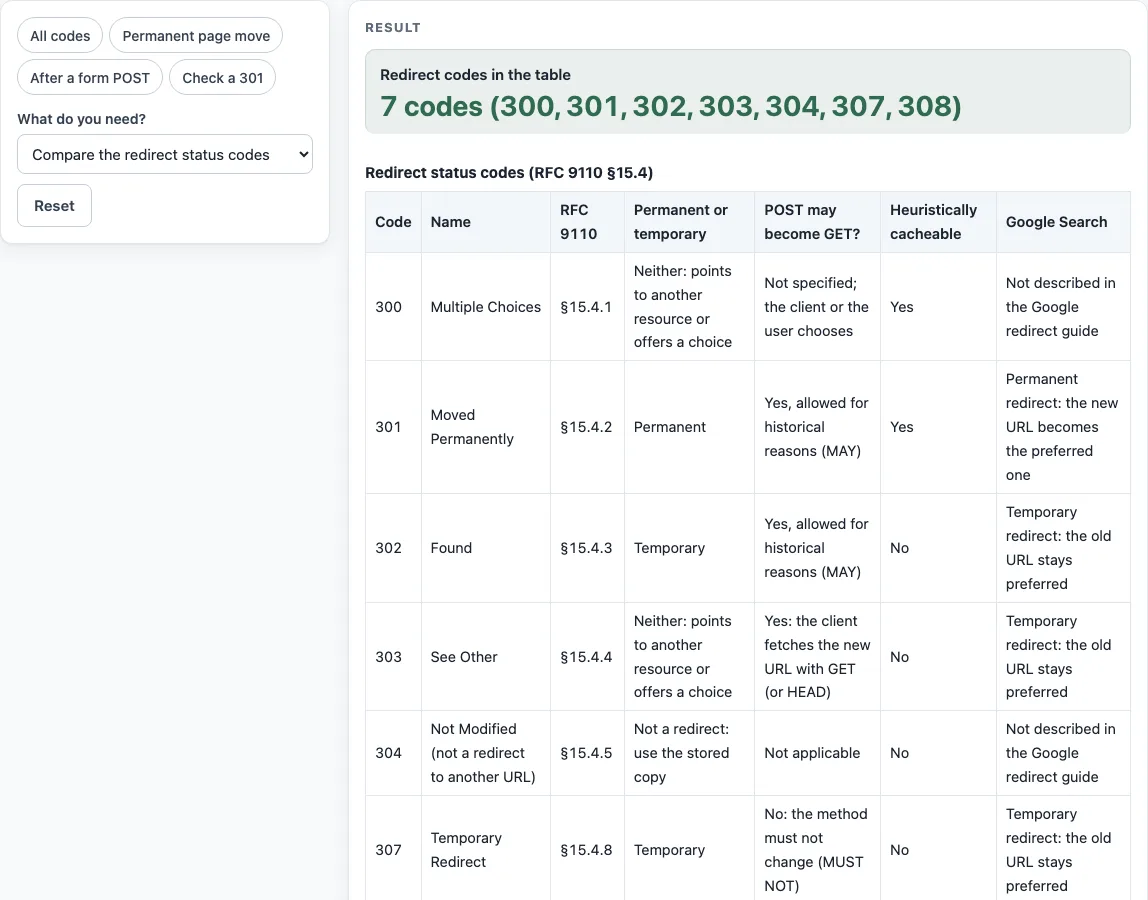
Each of its three modes answers a different question: which codes differ, which code to use, or what an existing response is doing. The table covers 300, 301, 302, 303, 304, 307 and 308, with the RFC 9110 section for each, whether the move is permanent, whether a POST may turn into a GET, whether the response is cacheable by default, and how Google Search treats it. The chooser ends with one ready line of configuration for Apache, nginx and Caddy.
How to use the Redirect Status Codes Tool
Start with What do you need? and choose one of three modes.
- To compare codes, select Compare the redirect status codes. The table shows each code with its Permanent or temporary type, whether POST may become GET? applies, and its Google Search treatment.
- To pick a code, select Pick the right code for my redirect. Answer Is the move permanent? and Must the request method and body be kept (POST stays POST)?, then answer Is this the answer to a form POST…?. Enter Old path and New URL.
- Read Recommended code and Why. Copy the one line you need for Apache, nginx or Caddyfile.
- To check an existing response, select Check a response (Location header) and paste your headers into Response headers. Optionally, enter the URL that was requested.
- Review Status in the response, Location header, Location form, Resolved URL, Request method on the next request and How Google treats it. If you pasted several responses, the table shows the full redirect chain.
- Read any warnings before you publish the rule. Then test it on your own server.
Nothing is saved, but Copy link puts the mode and your answers in the page address, so you can share a recommendation with a colleague. Print / save as PDF keeps a copy of the table or the check result.
What is a 307 redirect?
A 307 Temporary Redirect tells the client that the resource has moved for now. Under RFC 9110 section 15.4.8, the user agent MUST NOT change the request method, so a POST stays a POST and its body is sent again.
301 vs 302?
Both codes send the client to a new URL. 301 Moved Permanently signals a permanent move, while 302 Found signals a temporary one. RFC 9110 sections 15.4.2 and 15.4.3 say a user agent MAY change POST to GET for either code.
301 vs 308?
Both codes are permanent. 308 Permanent Redirect (RFC 9110 section 15.4.9) works like 301, but the request method must not change. It is the newer of the two, and the RFC notes that it might not be recognized everywhere.
302 vs 307?
Both codes are temporary. 307 forbids changing the method, while 302 allows POST to become GET. Use 307 when the request body must reach the new URL unchanged.
Which code after a form POST?
Use 303 See Other. RFC 9110 section 15.4.4 says it is primarily used to let the output of a POST action redirect to a different resource, and the follow-up request is a GET or HEAD. The chooser gives 303 whenever the redirect follows a POST, whatever the move type.
Does Google treat 307 like 302?
Yes. Google’s documentation treats 307 as equivalent to 302 and 308 as equivalent to 301. It treats 301 and 308 as permanent and 302, 303 and 307 as temporary. For a permanent redirect, Google uses the redirect as a signal that the target should be the canonical URL; for a temporary one it does not.
Can Location be relative?
Yes. Location is a URI-reference, and a relative value such as /login or about is resolved against the requested URL (RFC 9110 section 10.2.2). If the Location has no fragment, the redirect inherits the original fragment. Check mode shows the result in Resolved URL.
Are redirects cached?
Some are. 301 and 308 are heuristically cacheable (RFC 9110 section 15.1), so caches may reuse them for a heuristic lifetime. 302, 303 and 307 are not. Heuristic caching matters most when the response has no Cache-Control header, and RFC 9111 section 4.2.2 explains how caches use it.
Sources (checked 13 October 2026): RFC 9110 · RFC 9111 · Google Search Central
Worked examples
| Input | Result |
|---|---|
| permanent: yes, keep method: no, after POST: no | 301 Moved Permanently: Redirect 301 "/old" "https://example.com/new" |
| permanent: no, keep method: yes, after POST: no | 307 Temporary Redirect: Redirect 307 "/checkout" "/checkout/v2" |
| permanent: no, keep method: no, after POST: yes | 303 See Other: Redirect 303 "/order" "/order/thanks" |
| HTTP/1.1 301 Moved Permanently / Location: https://www.example.com/new-page | 301 Moved Permanently, Permanent, Absolute URL (scheme and host) |
| HTTP/2 307 / location: /login?next=/account | 307 Temporary Redirect, Temporary, Absolute path (/path) |
| all redirect codes | 300, 301, 302, 303, 304, 307, 308 |
Calculated by the tool above; open it with the same values to see each step.
Frequently asked questions
Which nginx version added 307 and 308?
nginx added 307 in version 1.1.16 (and 1.0.13 on the 1.0 branch). It added 308 in version 1.13.0, so older versions will reject that code.
Can Caddy return a 307 or 308?
Yes. Caddy’s redir keywords are temporary (302, the default), permanent (301) and html, and Caddy’s documentation says to use 307 or 308 when the method must stay the same. Put the number in the code position, for example redir /old /new 307.
How many redirects does Googlebot follow?
Googlebot follows up to 10 redirect hops. Check mode lists every hop in the chain and warns when the chain is long or mixes permanent and temporary codes.
Is 308 safe to use everywhere?
Not guaranteed. The RFC says 308 might not be recognized everywhere, and the tool shows a 308 support warning for this reason. Test it with the clients you care about.
What is the difference between 307 and 308?
Both keep the request method and body. 307 Temporary Redirect says the move is temporary, so clients keep using the old URL next time; 308 Permanent Redirect says the move is permanent, so clients and search engines should switch to the new URL.
Can I check a redirect I already have?
Yes, use Check a response (Location header) and paste the response headers you already have. The tool works only on the text you paste and does not contact your server.
Related tools
- .htaccess redirect generator: Use it when your site runs on Apache and you need a redirect line for an .htaccess file.
- nginx redirect generator: Use it when you need a
returnredirect for an nginx server block. - Domain redirect generator: Use it when one domain should send visitors to another.
- .htaccess force HTTPS generator: Use it when every HTTP request should redirect to HTTPS.