Quartz Cron Expression Generator
Build or paste a Quartz cron expression to see what it means, when it fires and its Unix cron form.
CronScheduleBuilder.cronSchedule. The tool runs entirely in your browser. It is free, needs no sign-up, and sends no data anywhere. Whether you are looking for a Quartz cron maker, a quartz cron online checker, or a way to compare Quartz with Spring’s cron format, this page explains the seven-field format and the Quartz-only symbols L, W, LW and #.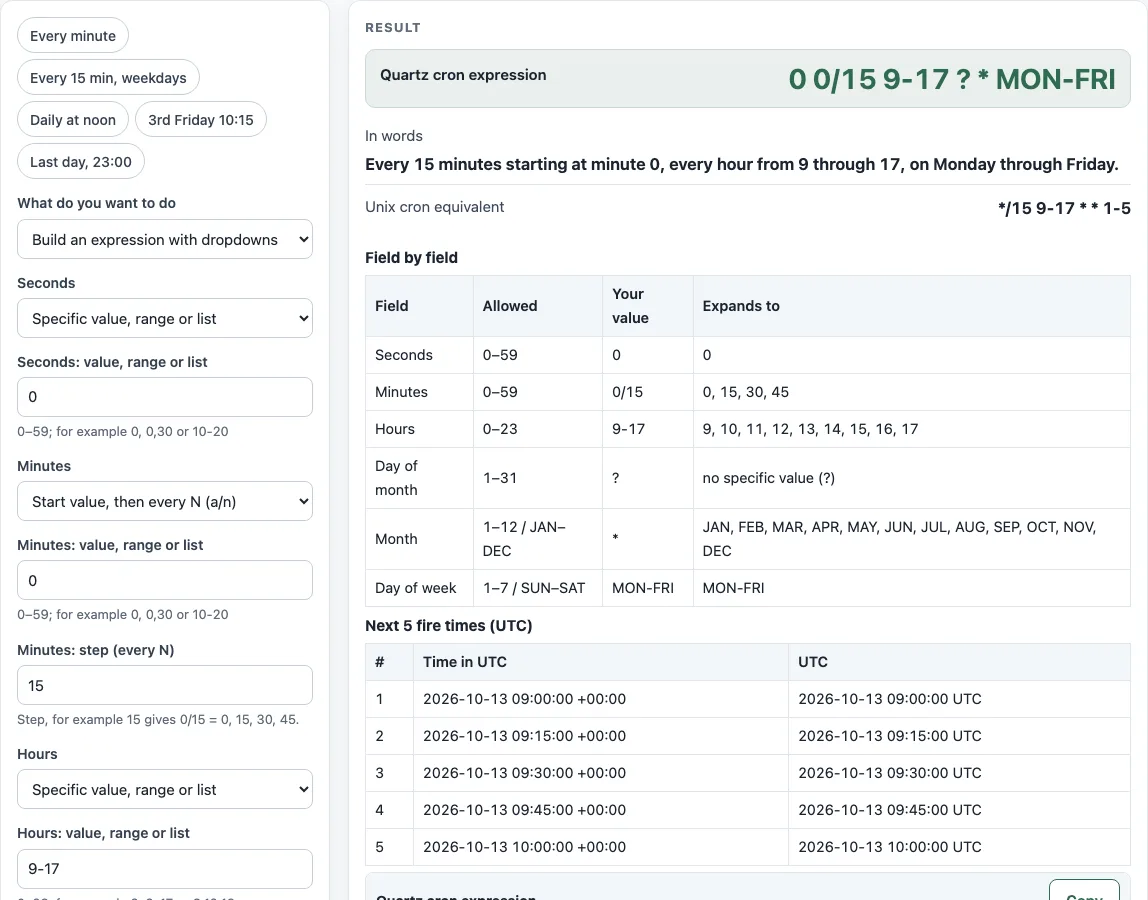
How to use the Quartz cron expression generator
- Open the What do you want to do dropdown and choose a mode: Build an expression with dropdowns, Check and explain an expression, or Convert Unix cron to Quartz.
- In the dropdown mode, set each field (Seconds, Minutes, Hours, Day of month, Month, Day of week) to Every (*), Specific value / range / list, or Start value then every N (a/n), and enter the value text.
- Set either Day of month or Day of week to No specific value (?). Quartz needs exactly one of them.
- For day-based rules, pick Last day of the month (L), Last weekday of the month (LW), Nth weekday of the month (d#n), or Last given weekday of the month (dL).
- To use a year, open More options and fill in Year. Leave it empty for a 6-field expression.
- To explain an existing expression, choose Check and explain an expression and paste it into Quartz expression.
- To convert, choose Convert Unix cron to Quartz and paste a 5-field line or a macro such as @daily into Unix cron expression (5 fields). If Second expression (also needed) appears, you need both lines.
- Under More options, set Time zone for the fire times (an IANA name, default UTC).
- Read Quartz cron expression, In words, and Next 5 fire times (zone). The preset chips (Every minute, Every 15 min weekdays, Daily at noon, 3rd Friday 10:15, Last day 23:00) load common schedules you can then edit.
What is a Quartz cron expression?
A Quartz cron expression is a schedule string with six or seven space-separated fields: seconds, minutes, hours, day of month, month, day of week, and an optional year. The Quartz scheduler reads it to decide when a job runs.
How is Quartz cron different from Unix cron?
Quartz adds a seconds field and an optional year field. Its day of week runs 1-7 from SUN to SAT, while Unix cron uses 0-7 with 1 as Monday. Quartz also requires ? in one day field and supports L, W, LW and #, which standard Unix cron does not have.
How do I run something every 15 minutes in Quartz?
Use 0 0/15 * * * ? or 0 */15 * * * ?. The 0/15 in the minutes field means minutes 0, 15, 30 and 45, and the seconds field is 0 so the job fires once at each of those times.
What does ? mean?
? means “no specific value”. Quartz requires it in either day-of-month or day-of-week, and the other of the two must be set. This tool rejects two ? symbols and a ? in any other field.
How do I run on the last day of the month?
Use 0 0 12 L * ? to fire at noon on the last day of each month. L in day-of-month means the last day, and L-3 means the third from last. In day-of-week, 6L means the last Friday.
How do I get the third Friday?
Use 0 15 10 ? * 6#3 to fire at 10:15 on the third Friday of each month. Friday is 6 in Quartz day-of-week numbering. If the occurrence does not exist in a month, for example 6#5 (a fifth Friday), the expression simply does not fire that month.
Can I convert Quartz cron to normal crontab?
Only in some cases. The conversion is offered when seconds is 0, there is no year, and the day fields contain no L, W, LW or #. Otherwise the page shows the reason, such as seconds, year, L/W, # or nL. Unix cron has no equivalent for the # form.
Is Spring cron the same as Quartz?
No. Spring Framework’s CronExpression has six fields with no year, and its day of week runs 0-7 with 0 and 7 as Sunday. Names such as MON-FRI mean the same thing in both, but a number can mean a different day, so check numeric day-of-week values before you copy an expression between them.
Sources (checked 13 October 2026): Quartz docs · crontab(5) · Spring docs
Worked examples
| Input | Result |
|---|---|
| 0 0 12 * * ? | At 12:00:00, every day. |
| 0 15 10 ? * MON-FRI | At 10:15:00, on Monday through Friday. |
| 0 15 10 ? * 6#3 | At 10:15:00, on the third Friday of the month. |
| 0 0 23 L * ? | At 23:00:00, on the last day of the month. |
| 30 2 * * 0 | 0 30 2 ? * SUN (At 02:30:00, on Sunday.) |
Calculated by the tool above; open it with the same values to see each step.
Frequently asked questions
What is the default expression on this page?
The default is 0 0/15 9-17 ? * MON-FRI, which means every 15 minutes starting at minute 0, every hour from 9 through 17, Monday through Friday. Its Unix equivalent is */15 9-17 * * 1-5.
Why does the tool warn that a job fires every second?
The warning appears when seconds, minutes and hours are all *, so the expression matches every second of every hour. This is rarely what you want for a scheduled job, so narrow at least one of those fields.
Which time zone are the fire times in?
The fire times use UTC unless you change Time zone for the fire times under More options. Local times that do not exist because of a daylight-saving gap are skipped.
What happens if no fire time is found?
The search stops at the year 2099, and the tool then shows the warning “No fire time was found before the year 2099.” This usually means the expression never matches, for example a day that does not occur in the chosen month.
Does MON-FRI mean the same in Quartz and Unix cron?
Yes. Day names mean the same weekdays in both, so MON-FRI is safe to copy. Numbers are not: 2-6 is Monday to Friday in Quartz but Tuesday to Saturday in Unix cron, which is why the tool warns when you use numeric days. Test the expression in your own Quartz setup before you rely on it.
Does the Quartz cron expression generator store my expressions?
No. The tool runs in your browser, and no data leaves it. It is free and needs no sign-up.
Related tools
- Cron expression generator - Use it to build standard five-field cron lines for Unix-style crontab files.
- Cron every 5 minutes - Use it when you only need the 5-minute interval pattern.
- Cron expression tester - Use it to check when a cron expression will fire.
- Crontab syntax explainer - Use it to learn what each field in a crontab line means.
- Cron time zone converter - Use it to see a schedule’s fire times in another time zone.
- Kubernetes CronJob generator - Use it to build a schedule for a Kubernetes CronJob.
- systemd timer generator - Use it to create a schedule for a systemd timer instead of cron.