Nginx Redirect Generator
Choose the kind of redirect and enter the URLs to get the nginx config.
nginx -t in our tests, but your own server configuration decides the result, so test it there too.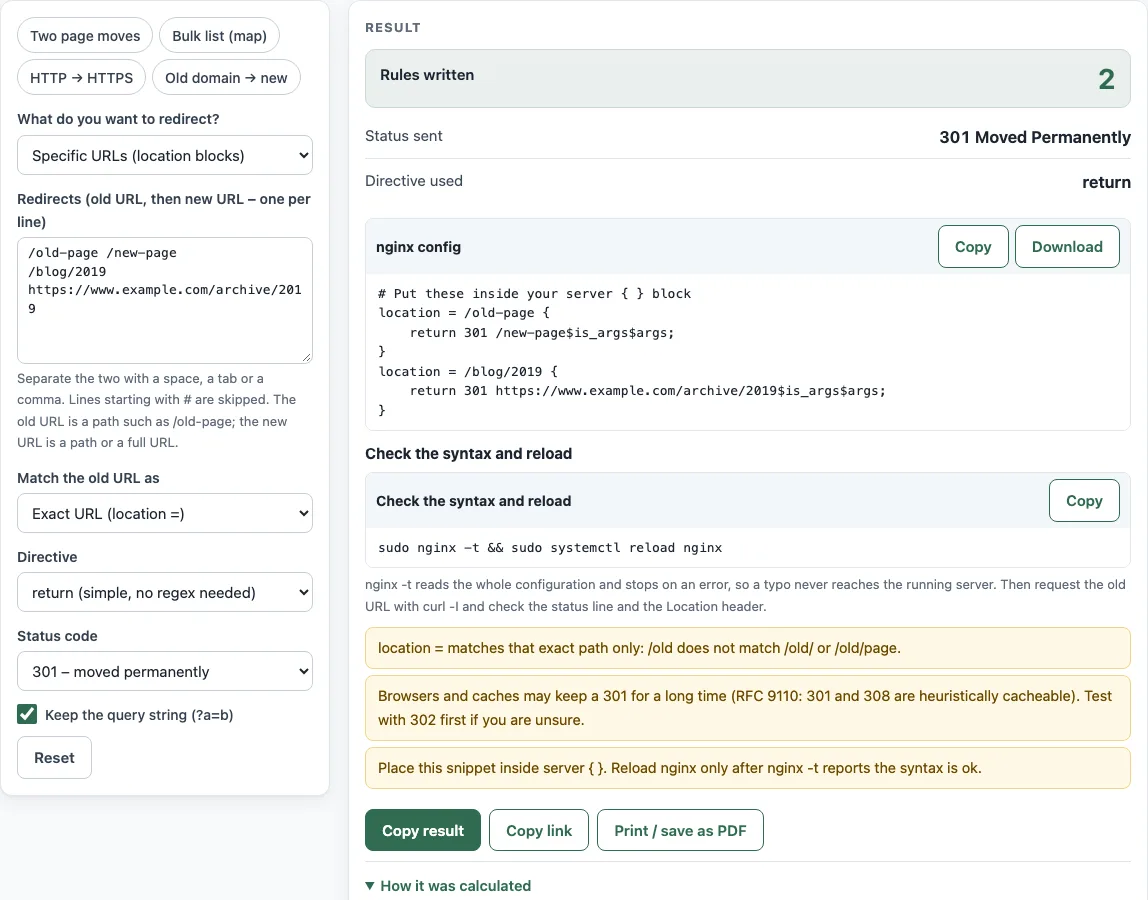
How to use the nginx redirect generator
- Open “What do you want to redirect?” and pick one of: Specific URLs (location blocks), A long list of URLs (map block), HTTP to HTTPS, www to non-www, or the reverse, or A whole domain to another domain.
- For URL modes, type your rules in “Redirects (old URL, then new URL – one per line)”. Put the old URL first, then the new URL, separated by a space, one pair per line.
- Set “Status code” to 301, 302, 307, or 308.
- Set “Match the old URL as” to exact, the URL and everything below it, or regular expression.
- Choose a “Directive”: return, rewrite … permanent, or redirect.
- Turn “Keep the query string (?a=b)” on or off.
- For the domain and www modes, fill in “Domain”, “Preferred host name”, “New domain”, or “Also redirect every subdomain” as needed.
- Check the outputs “Rules written”, “Status sent”, and “Directive used”.
- Read the “nginx config” box, or download
redirects.conf. - Add the file to your nginx configuration, then run
sudo nginx -t && sudo systemctl reload nginxto test the config before the reload takes effect.
Rows with duplicates, self-redirect loops, or unsafe characters are skipped, and the tool shows a warning for each one. Read the warnings before you deploy.
How do I redirect HTTP to HTTPS in nginx?
Use the “HTTP to HTTPS” mode. It writes a server block that listens on port 80 and answers every request with return 301 to the https address. This sends visitors and search engines to the secure version of the same page.
return or rewrite?
return is the simpler choice. It needs no regular expression and supports the codes 301, 302, 303, 307, and 308. rewrite takes a pattern, and in this tool it only sends 301 or 302, so choosing a 307 or 308 with rewrite produces an error.
How do I redirect many URLs?
Use “A long list of URLs (map block)”. The tool writes a map in the http context that matches each old path to its new one, plus an if in the server block that issues the redirect. Rows with a query string go into a second map, which is tested first. nginx matches plain map keys ignoring case, as the map module documentation states, so /OLD-PAGE is redirected too. For a list of more than 1000 rows the tool adds a note: if nginx -t complains about the map hash, raise map_hash_max_size or map_hash_bucket_size in the http block.
How do I keep the query string?
Keep “Keep the query string (?a=b)” on. The tool appends $is_args$args to the target, so /old-shop?id=7 becomes /shop/widget?id=7. $is_args is “?” only when the request has arguments, so nothing is added when there are none. With the option off, the query string is dropped.
How do I redirect www to non-www?
Choose “www to non-www, or the reverse” and set “Preferred host name” to the form you want. The tool writes a server block for the other name on ports 80 and 443. Port 443 needs certificate paths for that name, which the config leaves as placeholders for you to replace.
How do I redirect a whole domain?
Use “A whole domain to another domain” and fill in “Domain” and “New domain”. The old names go into server_name, and “Also redirect every subdomain” adds a leading dot to match all subdomains. The old domain must still resolve in DNS, and it needs a certificate for HTTPS visitors.
How do I test the config?
Run sudo nginx -t first. It checks the syntax and reports errors without changing anything. Reload nginx only after the test passes, using sudo systemctl reload nginx.
Sources (checked 13 October 2026): RFC 9110 · nginx docs
Worked examples
| Input | Result |
|---|---|
| /old-page /new-page; /blog/2019 https://www.example.com/archive/2019 | location = /old-page { / return 301 /new-page$is_args$args; |
| /old-page /new-page; /old-shop?id=7 /shop/widget | map $uri $new_uri { / map $request_uri $new_uri_q { |
| https: example.com | return 301 https://$host$request_uri; |
| www: example.com | return 301 https://www.example.com$request_uri; |
| domain: old.example → new.example.org | return 301 https://new.example.org$request_uri; |
Calculated by the tool above; open it with the same values to see each step.
Frequently asked questions
Which status code should I use for an nginx redirect, 301 or 302?
Use 301 when the move is permanent and 302 when it is temporary. RFC 9110 §15.4 defines 301 as permanent and 302 as temporary, and Google’s documentation on redirects says a permanent redirect is used as a signal that the target should be the canonical URL while a temporary one is not, so pick the code that matches your intent.
Does an nginx redirect fix a 404 error?
Not by itself. A 404 means nothing matched the request. A redirect sends visitors from an old URL to a new one, so it only helps when the old URL should lead somewhere specific.
Why did a row in my list get skipped?
The tool skips duplicate keys, self-redirect loops, rows with a query string in location mode, and entries containing $, spaces, quotes, semicolons, or braces. The warnings name the reason for each skipped row.
Can I redirect one path to a different path?
Yes. Use “Specific URLs (location blocks)” with “Match the old URL as” set to “the URL and everything below it”, or use a regular expression for a pattern. In regex mode, $1 in the target refers to the first captured part of the old path.
Why is the nginx redirect for a 307 or 308 not working on my server?
Those codes need a recent nginx. 307 needs version 1.1.16 or 1.0.13 or later, and 308 needs 1.13.0 or later. Check your version before you use them.
Related tools
- .htaccess redirect generator: Use it when your site runs on Apache and needs redirect rules in an .htaccess file.
- .htaccess force HTTPS generator: Use it when you want HTTPS forced on an Apache site instead of nginx.
- .htaccess rewrite rule generator: Use it when you need a rewrite pattern for Apache rather than nginx.
- Domain redirect generator: Use it when you are moving a whole domain and want a redirect for that purpose.
- Redirect status codes (301, 302, 307, 308): Use it to compare the codes before you choose one for your rule.