htpasswd Generator
Enter a user name and password to get the .htpasswd line and the basic auth config.
.htpasswd file, the format used by Apache HTTP Server and read by nginx. Enter a username and password, choose an algorithm, and copy the finished user:hash line into your file. It runs entirely in your browser, is free, and needs no sign-up. You can also use it as an htpasswd tool to check whether an existing line matches a password. Use it for an Apache htpasswd generator setup, for an .htaccess and htpasswd setup, or to create an htpasswd file online without installing anything. The page also writes the matching basic-auth blocks for Apache and nginx.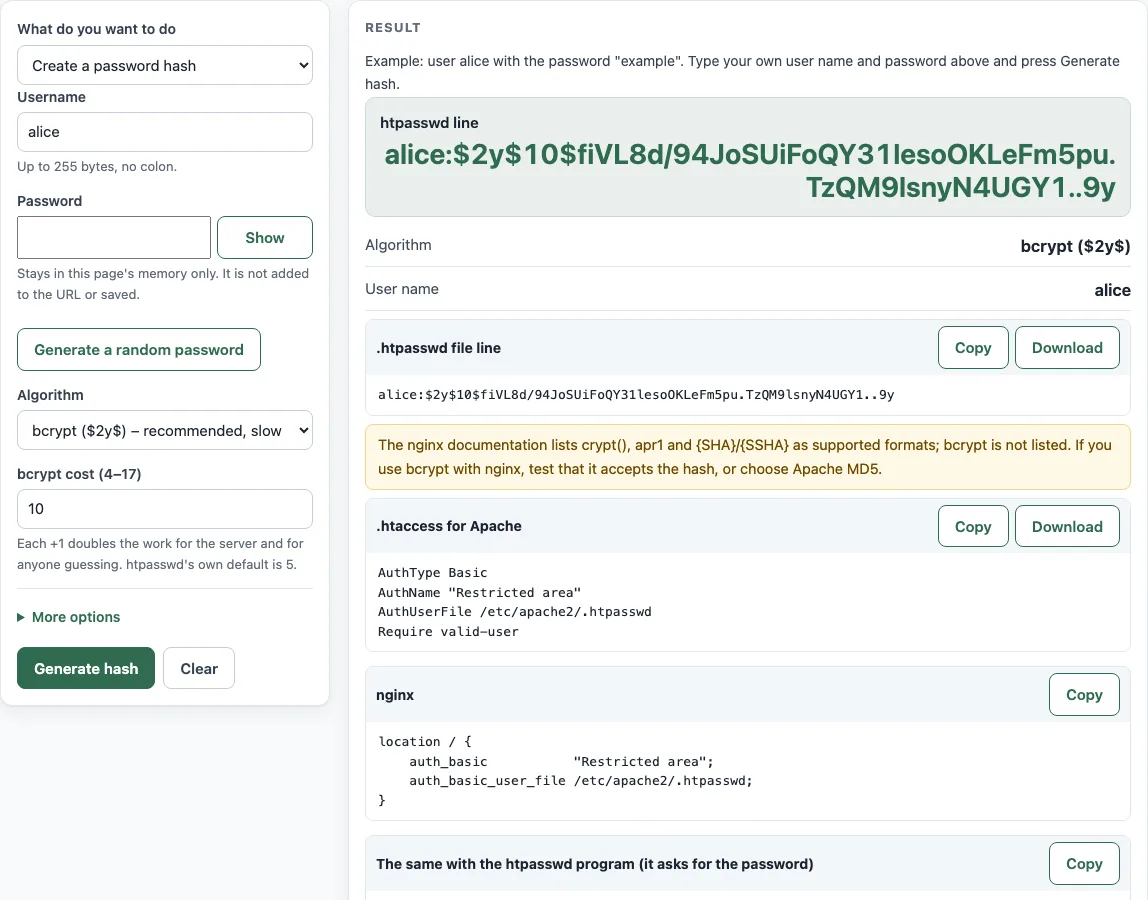
How to use the htpasswd generator
- Type a “Username”. It must not contain a colon and must be at most 255 bytes.
- Type a “Password” in the hidden field. Press “Show” to check it, or press “Generate a random password” to create one.
- Choose an “Algorithm”: “bcrypt ($2y$)”, “Apache MD5 ($apr1$)” or “SHA-1 ({SHA})”. bcrypt is the recommended choice for Apache.
- If you chose bcrypt, set the “bcrypt cost (4–17)”. The default here is 10.
- Press “Generate hash”.
- Optional: open “More options” to set “Login prompt text (AuthName)” and “Full path of the .htpasswd file on the server”.
- Copy the “htpasswd line” from the output, or download it as a .htpasswd file.
- Copy the “a .htaccess for Apache” block or the “nginx” block into your server configuration, and replace the placeholder paths with real ones.
To check an existing line, set “What do you want to do” to “Check a password against a hash”, paste one or more user:hash lines into “htpasswd line(s) to check”, type the “Password to test”, and press “Check password”. The table shows the algorithm and whether each line gives a match, no match, or cannot check here.
Every press of “Generate hash” creates a new salt, so each output differs even for the same password.
How do I generate an htpasswd file online?
Enter a “Username” and a “Password”, choose an algorithm, and press “Generate hash”. Copy the output line into a file named .htpasswd. The file holds one username:hash entry per line.
Which algorithm should I use?
Use bcrypt ($2y$) for Apache, because it is the strongest option here. Use Apache MD5 ($apr1$) if nginx must read the file, because nginx’s documentation does not list bcrypt. Avoid SHA-1 ({SHA}): it is unsalted, so equal passwords give equal hashes.
What cost should I choose for bcrypt?
The valid range is 4 to 17, htpasswd’s own default is 5, and this page starts at 10. Every +1 doubles the time needed to compute one hash: your server pays it on every login, and anyone trying to guess the password pays it on every guess. Pick the highest cost that still keeps logins quick on your own server.
How do I protect a folder with .htpasswd?
Put an .htaccess block in the folder you want to protect. It needs AuthType Basic, AuthName "<text>", AuthUserFile <absolute path> and Require valid-user. Set AuthUserFile to the full path of your .htpasswd file, and keep that file outside the web root.
Does nginx support .htpasswd?
Yes. nginx reads the same format through auth_basic_user_file, with crypt() hashes, apr1 and {SHA}/{SSHA}. Its documentation does not list bcrypt, so pick Apache MD5 ($apr1$) for nginx. Use auth_basic "<text>"; and auth_basic_user_file <path>; inside a location block.
Is it safe to type my password into an online tool?
On this page, the password stays in your browser. It is not sent over the network, not put in the page URL, not stored in localStorage or cookies, and not shown in the results. For production credentials, you can also generate the line with the htpasswd command on your own server.
How do I check an existing hash?
Choose “Check a password against a hash”, paste the user:hash line, enter the “Password to test”, and press “Check password”. The password is hashed with each line’s own salt and compared. To verify a line yourself, run htpasswd -vb file user password.
Sources (checked 13 October 2026): RFC 7617 · Apache HTTP Server docs · nginx docs
Worked examples
| Input | Result |
|---|---|
| alice, bcrypt, cost 5 | alice:$2y$05$1PrKEqweuKkMCy7aSGUjH.Aeh2/aBtN1ePmengnkDcg/ST4PXLK.i |
| bob, apr1 | bob:$apr1$saltsalt$yAAkm4libquA.ZWLHbSBq/ |
| carol, sha1 | carol:{SHA}W6ph5Mm5Pz8GgiULbPgzG37mj9g= |
| alice:$apr1$saltsalt$yAAkm4libquA.ZWLHbSBq/ | Match (1 of 1 lines) |
Calculated by the tool above; open it with the same values to see each step.
Frequently asked questions
Why does the same password give a different line each time?
Each line uses a random salt, so the hash changes even when the password stays the same. htpasswd works the same way, and every version still verifies against the original password.
Does bcrypt limit password length?
Yes. bcrypt uses only the first 72 bytes of a password and ignores anything after that. Keep passwords shorter than 72 bytes if every character must count.
Is basic authentication safe without HTTPS?
No. Basic authentication sends the password with every request. It is only Base64-encoded, not encrypted (RFC 7617), so serve the protected site over HTTPS.
Can I put several users in one file?
Yes. A .htpasswd file holds one user:hash line per user. Generate a line for each user and paste them one under another; Apache and nginx read every line.
Can I create the first line on the server instead?
Yes. Run htpasswd -c /path/.htpasswd user on the server. It asks for the password, and -B selects bcrypt.
How do I know my generated config works?
Test it on your own server, because no generated configuration is guaranteed to work. Check each line with htpasswd -vb file user password, then open the protected folder in a browser and confirm that the login prompt appears.
Related tools
- .htaccess force HTTPS generator: Use it to send visitors to HTTPS before adding a login prompt.
- .htaccess rewrite rule generator: Use it to build rewrite rules for an Apache site with protected folders.
- nginx redirect generator: Use it when your nginx site needs redirects alongside basic authentication.
- Redirect status codes: Use it to pick the right code (301, 302, 307 or 308) for a redirect.