.htaccess Rewrite Rule Generator
Pick a rewrite recipe to get the .htaccess rules, or test your own RewriteRule against a URL.
The htaccess rewrite generator builds Apache .htaccess rewrite rules for common jobs, including pretty URLs, removing .php or .html from addresses, sending requests to a front controller, adding or removing trailing slashes, showing a maintenance page, and moving a directory. Its tester also shows what a RewriteRule would do with a given request. The tool runs entirely in your browser and sends nothing anywhere. It is free, and no sign-up is needed.
A rewrite rule changes which file or script Apache uses for a request, so visitors can use cleaner addresses while the server still runs the real file. Each recipe gives you a block to place in your .htaccess file, with an explanation of every line. Treat the output as a starting point, and test it on your own site before you rely on it.
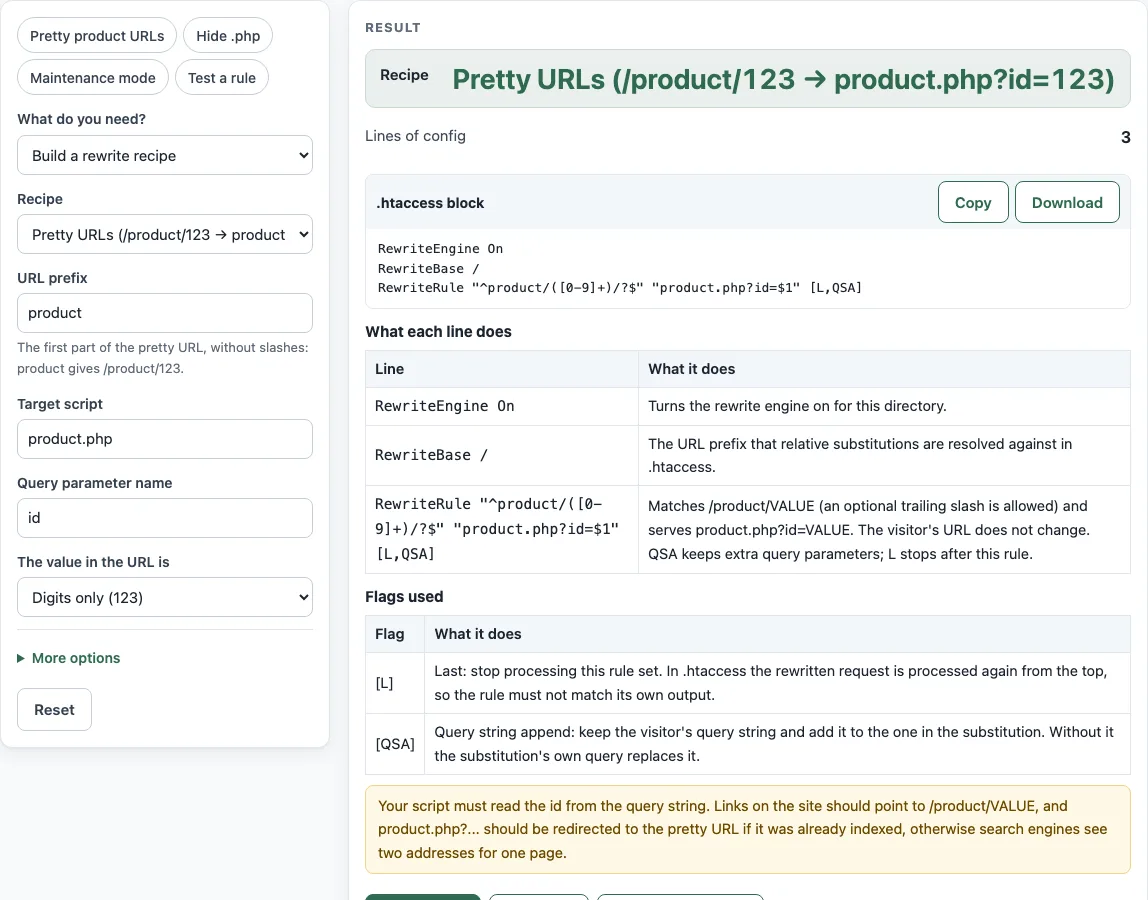
How to use the .htaccess Rewrite Generator
- Open What do you need? and choose Build a rewrite recipe to get a ready-made block, or Test a RewriteRule to check a rule you already have.
- For a recipe, select one from the list: pretty URLs, remove .php/.html, front controller, add or remove trailing slash, maintenance page with an allowed IP, or move a directory. The tool starts with the Pretty URLs recipe selected.
- Fill in the values the recipe asks for, such as the prefix, script name, parameter, or site folder (RewriteBase). For maintenance, enter the IP address you want to allow.
- Read the .htaccess block, then check What each line does and Flags used. If a Simpler alternative appears, compare it with the main block. The Recipe and Lines of config outputs show which recipe you chose and how long the block is.
- To check a rule, choose Test a RewriteRule. Enter the RewriteRule pattern, Substitution, Flags, and Request to test, then pick Where the rule lives (.htaccess per-directory or server config).
- Read Resulting URL, What Apache does, Pattern matches, Captured groups, and the table of $0, $1 and so on. The steps and warnings explain any problems.
The tester loads with a worked example: pattern ^product/([0-9]+)/?$, substitution product.php?id=$1, flags L,QSA, and request /product/123?ref=home. In .htaccess context, the Resulting URL is product.php?id=123&ref=home, with $1 = 123 and an internal rewrite. Put your finished block into your .htaccess file, then test the live URLs on your site.
How do I rewrite /product/123 to product.php?
Use the Pretty URLs recipe. It matches a path such as /product/123, captures the digits, and passes them to product.php as the id parameter, so visitors see the clean address. The rule behind it looks like this:
RewriteEngine On
RewriteBase /
RewriteRule "^product/([0-9]+)/?$" "product.php?id=$1" [L,QSA]
RewriteEngine On switches the rewrite engine on. RewriteBase / sets the folder that relative substitutions are based on. ([0-9]+) captures the digits, and $1 inserts that captured text into the substitution. The Apache mod_rewrite documentation describes these directives in the same way.
Why does my RewriteRule with ^/ not work in .htaccess?
In per-directory context, the path Apache matches never has a leading slash. The mod_rewrite documentation states that a pattern with ^/ never matches there. Write ^product/ instead of ^/product/.
The server config context is different. The tester keeps the leading slash in that context, so ^/ can match there. Check the Where the rule lives setting when you test a pattern that starts with a slash.
What does [L] do vs [END]?
[L] (last) stops the current rule set once the rule matches. In .htaccess, the rewritten request is then processed again, so later rules can run against the new URL. [END] stops all rewriting for the request.
The front-controller recipe uses [END] so that the rewritten /index.php request is not rewritten again on the next pass. If a later rule should not act on the rewritten URL, choose [END]; if later rules must still see it, [L] is the right flag.
Why does the Pretty URLs rule use QSA?
QSA (query string append) keeps the original query string and adds it after the new one. Without it, the substitution’s own query replaces the old query. With it, /product/123?ref=home becomes product.php?id=123&ref=home, so the ref value is not lost.
Sources (checked 13 October 2026): Apache HTTP Server docs
Worked examples
| Input | Result |
|---|---|
| Pretty URLs (/product/123 → product.php?id=123) | RewriteRule "^product/([0-9]+)/?$" "product.php?id=$1" [L,QSA] |
| Remove .php or .html from URLs | RewriteRule "^" "/%1" [R=301,L] | RewriteRule "^(.+?)/?$" "$1.php" [L] |
| Front controller (everything to index.php) | RewriteRule "^(.*)$" "/index.php" [END] |
| Maintenance page with an allowed IP | RewriteRule "^" - [R=503,L] |
| ^product/([0-9]+)/?$ → product.php?id=$1 [L,QSA], /product/123?ref=home | Internal rewrite (the browser's URL stays): product.php?id=123&ref=home |
Calculated by the tool above; open it with the same values to see each step.
Frequently asked questions
How do I remove .php from URLs?
Use the Remove extension recipe and select php. A 301 redirect sends requests for the .php address to the clean address. A second rule then serves the .php file when the clean address is requested, and only if that file exists.
How do I send all requests to index.php?
Use the Front controller recipe with index.php as the entry. It sends any request that does not match an existing file or directory to /index.php and uses [END]. The recipe also lists FallbackResource /index.php as an alternative, which Apache’s documentation on rewriting suggests as the simpler way to do the same thing.
How do I put the site in maintenance mode but let me in?
Use the Maintenance page recipe and enter your IP address. Visitors receive a 503 response with /maintenance.html, and requests from your IP skip that rule. You can enter several IP addresses, and both IPv4 and IPv6 are validated.
How can I test a RewriteRule without a server?
Open Test a RewriteRule and enter the pattern, substitution, flags, and request. The tester works out the Resulting URL and What Apache does in your browser. It stops with a message when a pattern uses unsupported syntax, such as possessive quantifiers or atomic groups, and it warns about flags it does not simulate, so check those warnings before you rely on a result. Confirm the final behavior on your own server.
Related tools
- .htaccess redirect generator: use it when you only need to send one URL to another address, not a full rewrite rule.
- .htaccess force HTTPS generator: use it to send all HTTP traffic to HTTPS.
- nginx redirect generator: use it if your site runs on nginx rather than Apache.
- Domain redirect generator: use it to send one domain to another domain.
- Redirect status codes: use it to choose between 301, 302, 307 and 308 for a redirect.