.htaccess Redirect Generator
Paste old and new URLs, one pair per line, to get the .htaccess redirect rules.
This htaccess redirect generator turns a list of old and new URLs into a ready-to-use .htaccess block for Apache. Type one pair per line, choose a status such as 301, and the tool writes the matching Redirect, RedirectMatch or RewriteRule lines, with warnings about loops, chains and rows it cannot read. It runs entirely in your browser, sends nothing anywhere, is free and needs no sign-up.
Use it when you move a page, rename a folder or remove a URL on an Apache site and need a permanent (301) redirect written correctly. It is also useful if you are not sure whether a plain Redirect or a mod_rewrite rule fits your case, because the tool picks the module for each row and explains what it wrote.
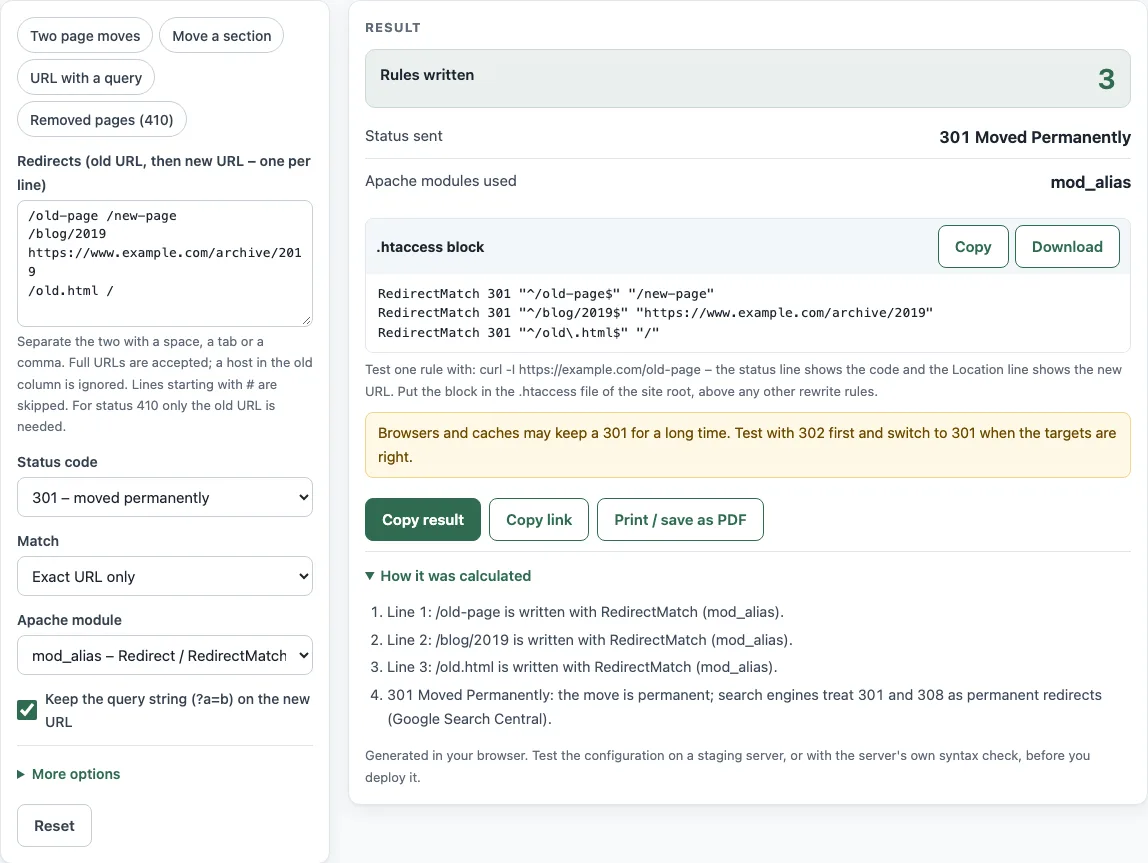
How to use the htaccess redirect generator
- In the Redirects (old URL, then new URL – one per line) box, type one redirect per row, such as
/old-page /new-page. Separate the two URLs with a space, a tab or a comma. - Choose a Status code. Use 301 for a permanent move, or 410 if the page has been removed. For 410 you only need the old URL.
- Set Match to Exact URL only for a single page, or to Prefix – the URL and everything below it for a whole folder.
- Pick an Apache module. mod_alias – Redirect / RedirectMatch covers most plain redirects. mod_rewrite – RewriteRule is the other option.
- Turn on Keep the query string (?a=b) on the new URL if visitors’ query strings should carry over to the new address.
- Open More options if you need Ignore upper/lower case in the old URL or The old column is a regular expression.
- Check Rules written, Status sent and Apache modules used, then read any Warnings and the explanation under each rule.
- Click Copy, or Download as
.htaccess, and add the block to your site’s.htaccessfile.
The form opens with three exact 301 rules, so you can see the output format before you change anything. Lines starting with # are treated as comments, and blank lines are ignored.
How do I redirect one page in .htaccess?
Put one row in the Redirects box, such as /old /new, leave the status at 301, and set Match to Exact URL only. The tool writes a single line like RedirectMatch 301 "^/old$" "/new", which Apache reads from the mod_alias module.
What is the difference between Redirect and RedirectMatch?
Both belong to Apache’s mod_alias module. Redirect matches a plain path prefix, while RedirectMatch matches a regular expression against the URL path, and $1 in the target can reuse captured text. The tool uses RedirectMatch for exact matches and Redirect for case-sensitive prefix matches.
Why does my Redirect also catch /old/anything?
Redirect is a prefix match, so any request that starts with the path matches it. Only complete path segments count, so /old catches /old/anything but not /olderpage. To redirect just the one page, set Match to Exact URL only, which writes anchored patterns with ^ and $.
How do I redirect a URL with a query string?
mod_alias cannot see the query string, so the tool moves that row to mod_rewrite. It writes RewriteCond "%{QUERY_STRING}" "^id=7$" followed by a RewriteRule. Keep the query string (?a=b) on the new URL controls whether the query is passed on: when it is off, the rule discards the old query.
Which status should I use?
Use 301 for a permanent move; Google Search treats 301 and 308 as permanent. Use 302, 303 or 307 when the move is temporary, and 410 when the page has been removed for good. Per RFC 9110 section 15.4.2, browsers may cache a 301 heuristically, so only use it when you are sure the move is final.
Why does my redirect loop?
A loop happens when the target matches the same rule, so the request keeps bouncing between addresses. The tool checks for this and skips a row whose target points back to itself, with a warning. It also flags cycles such as A to B to C to A, chains such as A to B to C, and a prefix rule that points into its own subtree.
Do I need RewriteEngine On?
You need it only for mod_rewrite rules. When the output includes RewriteRule lines, the tool writes RewriteEngine On once above them. Redirect and RedirectMatch do not need it. In a .htaccess file, mod_rewrite also needs Options FollowSymLinks or SymLinksIfOwnerMatch to be allowed for that directory, as the mod_rewrite documentation explains; most hosts already allow it.
Sources (checked 13 October 2026): RFC 9110 · Apache HTTP Server docs · Google Search Central
Worked examples
| Input | Result |
|---|---|
| /old-page /new-page; /contact-us.html /contact | RedirectMatch 301 "^/old-page$" "/new-page" / RedirectMatch 301 "^/contact-us\.html$" "/contact" |
| /blog https://www.example.com/articles | Redirect 301 "/blog" "https://www.example.com/articles" |
| /old-shop?id=7 /shop/widget | RewriteCond "%{QUERY_STRING}" "^id=7$" / RewriteRule "^old-shop$" "/shop/widget" [R=301,L] |
| /discontinued/widget | RedirectMatch gone "^/discontinued/widget$" |
Calculated by the tool above; open it with the same values to see each step.
Frequently asked questions
Is the generated .htaccess file guaranteed to work?
No. Your server configuration can change how Apache behaves, so test each redirect after uploading the file. Request the old URL and check that the status and the target in the response match what you expected.
Where do I put the downloaded .htaccess file?
Place it in the folder the rules should apply to, usually the root folder of your website. Apache reads per-directory files, so a file in a subfolder only affects that folder and below.
What happens to rows the tool cannot use?
A new URL such as example.com/x, //host/x or page.html is rejected with a reason, and that row is skipped. The other rows are still generated, so read the Warnings after each change.
Can I use 410 for a page that has moved?
No. 410 tells visitors and search engines that the page is gone and has no replacement. If the content now lives elsewhere, use 301 with the new URL.
How do I check a redirect after uploading?
Run curl -I https://www.example.com/old-page with your own address. The first line shows the status, such as HTTP/1.1 301 Moved Permanently, and the Location: line shows where the request is sent. Check one row of each kind you wrote: an exact page, a folder and any row with a query string.
Does the tool store the URLs I enter?
Everything runs in your browser, and the tool sends nothing anywhere. It is free and needs no sign-up.
Related tools
- .htaccess force HTTPS generator: use it when you want all traffic to load over HTTPS.
- .htaccess rewrite rule generator: use it for rewrite rules that go beyond simple redirects.
- nginx redirect generator: use it if your site runs on nginx instead of Apache.
- Domain redirect generator: use it to send one whole domain to another.
- Redirect status codes: use it to compare 301, 302, 307 and 308 before you pick one.
- htpasswd generator: use it to password-protect a directory with Apache.