.htaccess Force HTTPS Generator
Choose your host name and options to get the .htaccess rules that force HTTPS.
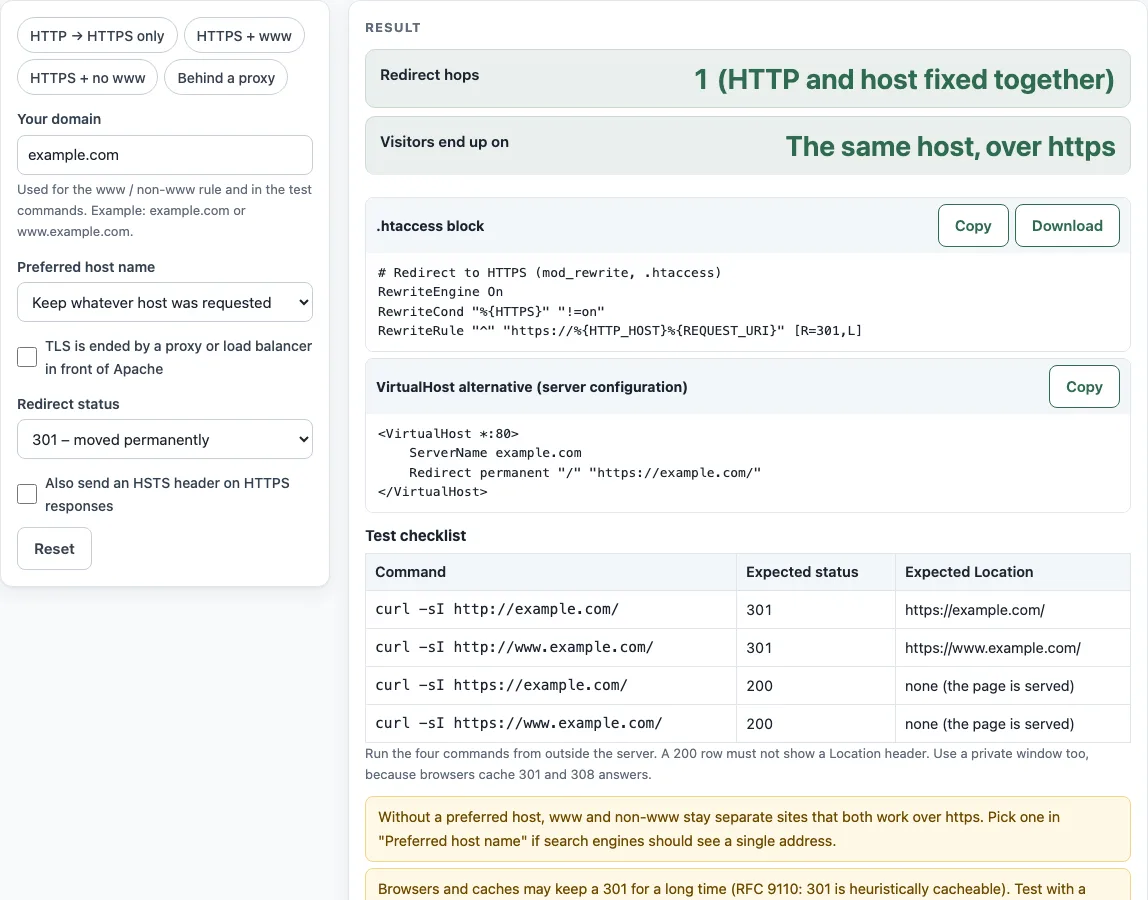
How to use the htaccess force HTTPS tool
- Type your site’s address in Your domain.
- Open Preferred host name and choose Keep whatever host was requested, Always use www, or Never use www.
- If a proxy or load balancer in front of Apache ends the TLS connection, tick TLS is ended by a proxy or load balancer in front of Apache.
- Pick a Redirect status of 301 or 308.
- Optionally tick Also send an HSTS header on HTTPS responses, then set HSTS max-age and, if needed, Add includeSubDomains.
- Read Redirect hops and Visitors end up on to confirm the redirect behaves as you intended.
- Copy the code from .htaccess block into your .htaccess file.
- Run the commands in Test checklist and compare each result with the expected status and Location.
The page also prints the VirtualHost alternative (server configuration) block, which you can use instead if you can edit the server configuration. Put the .htaccess rules near the top of the file, before other rewrite rules such as a front controller, so the redirect happens before anything else rewrites the request. If the file already has RewriteEngine On, you only need it once. The tool sends nothing anywhere and keeps no record of your entries, so copy both code blocks before you leave the page.
How do I force HTTPS in .htaccess?
Add RewriteEngine On, a RewriteCond that checks that %{HTTPS} is not “on”, and a RewriteRule that redirects with [R=301,L]. Apache’s mod_rewrite sets %{HTTPS} to “on” when the connection uses SSL/TLS, so the rule fires only for plain HTTP requests.
The rule’s target uses %{REQUEST_URI}, the whole path, because in per-directory context a pattern never has a leading slash. The query string is kept automatically. Pair R=301 with L, as the Apache flags documentation advises, so that no later rule changes the URL before the redirect is sent.
Why do I get “too many redirects”?
The usual cause is a proxy or load balancer that ends TLS in front of Apache. Apache then sees %{HTTPS} as always off, so it redirects every request again and again. Tick the proxy option, which swaps the test for RewriteCond "%{HTTP:X-Forwarded-Proto}" =http [NC].
Only trust X-Forwarded-Proto if you control the upstream proxy and it overwrites that header on every request. Otherwise a visitor can send the header themselves.
How do I force https and www in one redirect?
Set Preferred host name to Always use www or Never use www. The generated rule sends all four combinations of http/https and www/non-www to the preferred host in one hop. Requests for any other host name on plain HTTP go to HTTPS on that same host, and other subdomains over HTTPS are not changed.
Should I use .htaccess or the VirtualHost?
Use the VirtualHost with Redirect if you can edit the server configuration. Apache’s documentation recommends a dedicated port-80 VirtualHost for forcing HTTPS, and Redirect permanent is the simpler option. Use .htaccess when that file is the only access you have, since mod_rewrite is the right tool in that case.
In the VirtualHost version, the port-80 block lists ServerName and ServerAlias for the www names. If you chose a preferred host, a second port-443 block covers the other name and includes an SSL placeholder comment.
How do I add HSTS?
Tick Also send an HSTS header on HTTPS responses and choose an HSTS max-age. The header is Strict-Transport-Security, and Header always set applies it only when the request is HTTPS. Browsers ignore HSTS over plain HTTP, and max-age=0 removes an existing policy (RFC 6797, section 8.1).
Start with 300 seconds, and check every subdomain before you use a longer value or Add includeSubDomains. A long policy can make parts of your site unreachable over HTTP for as long as it lasts.
How do I test it?
Run the four curl -sI commands in Test checklist. They cover HTTP and HTTPS, each with both host names. Each response should show the expected status, 301 or 308 for redirects and 200 for the HTTPS host, and the expected Location header. In proxy mode, add -H 'X-Forwarded-Proto: http' or -H 'X-Forwarded-Proto: https' to each command.
Sources (checked 13 October 2026): RFC 6797 · RFC 9110 · Apache HTTP Server docs
Worked examples
| Input | Result |
|---|---|
| example.com, any host, 301 | The same host, over https / RewriteRule "^" "https://%{HTTP_HOST}%{REQUEST_URI}" [R=301,L] |
| example.com, to www, 301 | https://www.example.com/ / RewriteRule "^" "https://www.example.com%{REQUEST_URI}" [R=301,L] | RewriteRule "^" "https://%{HTTP_HOST}%{REQUEST_URI}" [R=301,L] |
| www.example.org, to non-www, 308 | https://example.org/ / RewriteRule "^" "https://example.org%{REQUEST_URI}" [R=308,L] | RewriteRule "^" "https://%{HTTP_HOST}%{REQUEST_URI}" [R=308,L] |
| example.com, any host, 301, proxy, HSTS | The same host, over https / RewriteRule "^" "https://%{HTTP_HOST}%{REQUEST_URI}" [R=301,L] |
Calculated by the tool above; open it with the same values to see each step.
Frequently asked questions
Is the generated code guaranteed to work on my server?
No. The rules depend on your server setup, so run the commands in the Test checklist and check the results. The rules need mod_rewrite, and the HSTS line needs mod_headers.
Should I choose 301 or 308 for the redirect status?
301 is the common choice for a permanent redirect. 308 is newer, dating from 2014, and might not be recognized everywhere (RFC 9110, section 15.4.9). Both can be cached by browsers, so test your choice before you publish it.
Will the redirect keep the path and query string?
Yes. The target is built from %{REQUEST_URI}, so http://example.com/shop/item?id=7 goes to https://example.com/shop/item?id=7. mod_rewrite passes the query string on unchanged unless a rule says otherwise.
Why do some HTTPS requests not redirect?
Requests that already arrive over HTTPS on the preferred host are left alone and get your page with status 200. Only plain HTTP requests, or HTTPS requests for the other host name when you chose www or non-www, are redirected.
Does the tool send my domain name anywhere?
No. The tool runs entirely in your browser and sends nothing anywhere. It is free and needs no sign-up.
Can I add HSTS preload from this page?
No. The tool does not offer the preload option. It only offers the HSTS max-age and includeSubDomains settings shown above.
Related tools
- .htaccess redirect generator: Use it to write a redirect for a single old URL or path.
- .htaccess rewrite rule generator: Use it when you need a custom rewrite rule beyond HTTPS and host name handling.
- nginx redirect generator: Use it if your site runs on nginx instead of Apache.
- Domain redirect generator: Use it to send one domain name to another.
- Redirect status codes: Read it to compare 301, 302, 307, and 308 before you pick a status.
- htpasswd generator: Use it to create password files for protecting a directory with basic authentication.