Domain Redirect to Another Domain
Enter the old and new domain to get the redirect config for Apache, nginx and Caddy.
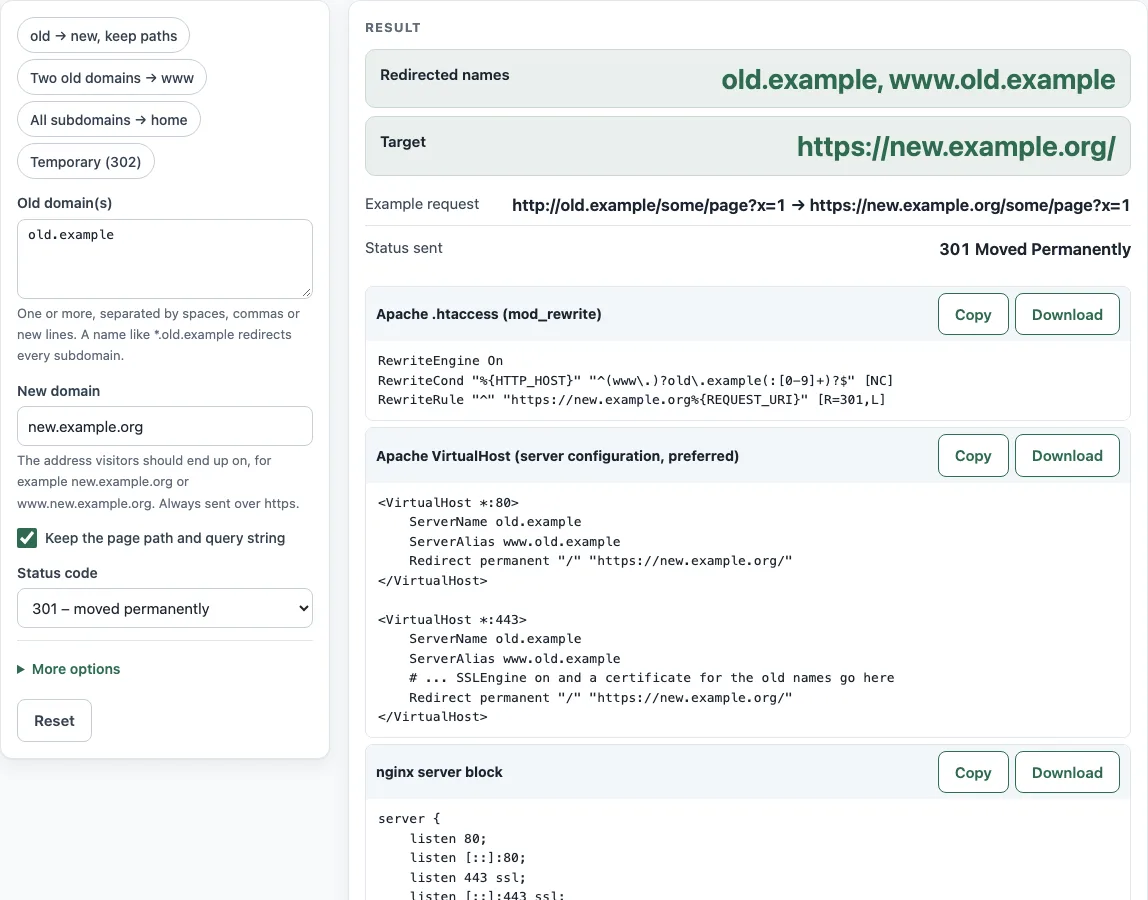
How to use the Domain Redirect Generator
- In “Old domain(s)”, enter each domain you are moving from, such as
old.example. Enter*.old.exampleto cover all subdomains. - In “New domain”, enter the domain visitors should land on. Any scheme, path or port you type is removed automatically.
- Leave “Keep the page path and query string” on if
/pricingshould go to/pricingon the new domain. Turn it off only if every old URL should go to the new home page, and read the warnings first. - Pick a “Status code”. Use 301 or 308 for a permanent move, or 302 or 307 for a temporary one.
- Open More options. Turn on “Also redirect the www. version of each old domain” if visitors use www. Turn on “The old domain is served over HTTPS (port 443) as well” if the old site uses HTTPS.
- Check that “Redirected names”, “Target”, “Example request” and “Status sent” match what you intend.
- Pick the block for your server: “Apache .htaccess (mod_rewrite)”, “Apache VirtualHost (server configuration, preferred)”, “nginx server block” or “Caddyfile”. Copy it into the matching file, and replace the placeholder certificate paths if you enabled HTTPS.
- Run the commands in “Test with curl” against each old name, and confirm the status and Location shown match the expected values.
The tool does not need an account and does not save your entries, so you can change a setting and regenerate the output as often as you like.
How do I redirect one domain to another?
Put a redirect rule for the old domain in its web server configuration. The rule answers each request with a status code and a Location header that names the new domain. The generator writes the same status and target for each server, so you can choose the one your host uses. Apache’s preferred form is Redirect inside a VirtualHost with ServerName and ServerAlias, as described in the Apache mod_alias documentation.
Can DNS redirect a domain?
No. DNS only maps a name to an address or to another name. A CNAME record makes one name an alias for another name (RFC 1034, section 3.6.2), but DNS carries no URL, so it cannot tell a browser to go elsewhere. Only a web server can send the redirect, and for HTTPS the old name also needs a certificate valid for that name. A “redirect domain via DNS” setup therefore still needs a server rule, and the A or AAAA records for the old name must keep pointing at that server.
Which redirect is permanent?
301 Moved Permanently and 308 Permanent Redirect are the permanent codes. RFC 9110, section 15.4, defines both as permanent. Google treats 301 and 308 as permanent and 302, 303 and 307 as temporary, and follows up to 10 hops. Use 301 or 308 for a permanent URL redirect, and 302 or 307 only when the move is temporary.
Should every old URL go to the new home page?
No. Google Search Central advises against redirecting many old URLs to one irrelevant destination, such as the home page of the new site. Visitors can be confused, and Google may treat the redirects as a soft 404. Keep the page path so each old URL reaches its matching page on the new domain. A home-page redirect only makes sense when the path is dropped and the new site has no matching pages.
How do I redirect all subdomains?
Enter a wildcard name such as *.old.example in “Old domain(s)”. The generator then writes a wildcard match: server_name .old.example for nginx, ServerAlias *.old.example for Apache, and *.old.example for Caddy. You also need a DNS wildcard record for the subdomains, and a certificate that covers them. Certificate authorities validate wildcard names through DNS rather than over HTTP, and the * can only be the left-most label.
Why do I get a certificate error on the old domain?
A browser connects to the old name over HTTPS before any redirect can happen. That means the old name needs its own valid certificate. A certificate for the new domain does not cover the old name, so the browser stops with an error before it reads the redirect. Install a certificate that lists each old name, or the redirect never runs.
How long should I keep the redirect?
At least a year. Google advises keeping server-side permanent redirects for at least a year. Browsers and caches may store 301 and 308 responses (RFC 9111, section 4.2.2), so removing the redirect early can send visitors to errors. Keep it running for as long as old links exist.
Sources (checked 13 October 2026): RFC 1034 · RFC 9110 · RFC 9111 · Apache HTTP Server docs · nginx docs · Caddy docs · Google Search Central
Worked examples
| Input | Result |
|---|---|
| old.example → new.example.org | 301 Moved Permanently, path and query kept |
| old.example, old.example.net → www.new.example.org | 308 Permanent Redirect, path and query kept |
| *.old.example → new.example.org | 301 Moved Permanently, all to home page |
| old.example → new.example.org | 302 Found, path and query kept |
Calculated by the tool above; open it with the same values to see each step.
Frequently asked questions
Does the redirect keep the query string?
With “Keep the page path and query string” on, every block passes the path and the query on, so /p?x=1 on the old domain goes to /p?x=1 on the new one. With it off, the .htaccess, nginx and Caddy blocks send every request to the new home page without the query. For the VirtualHost RedirectMatch line, test with curl, because Apache’s documentation only describes query handling for Redirect.
Which Apache block should I use?
Use “Apache VirtualHost (server configuration, preferred)” if you can edit the server configuration. Use “Apache .htaccess (mod_rewrite)” if you only have access to .htaccess, and read the .htaccess requirements shown on the page before you paste it.
Why is my new domain rejected?
A new domain that equals an old name, the www version of an old name, or a subdomain of a wildcard old name would create a redirect loop, so the tool rejects it. Invalid names and a *. wildcard in “New domain” are also errors.
Can I redirect several old domains to one new domain?
Yes. List them in “Old domain(s)”, and they will all share the same target. In an .htaccess file, the tool joins several domains with | in one rule.
Do I need to test the config after I paste it?
Yes. The “Test with curl” table lists curl -sI commands for HTTP and HTTPS on each old name, with the expected status and Location. The tool cannot check your server, so run these commands yourself after the config is in place.
Related tools
- .htaccess redirect generator: use it when you only need a redirect rule for a single path in an .htaccess file.
- nginx redirect generator: use it when you want a redirect block for nginx alone.
- Redirect status codes: use it to compare 301, 302, 307 and 308 before you choose a status code.
- .htaccess force HTTPS generator: use it to send HTTP traffic to HTTPS on the same domain.
- .htaccess rewrite rule generator: use it when you need a rewrite rule that goes beyond a simple redirect.