Docker Run to Compose Converter
Paste one or more docker run commands to get the equivalent compose.yaml.
docker run command into a Docker Compose file, so the same container settings can live in a compose.yaml instead of a long terminal command. Paste one or more commands and it writes the Compose file for you, with each command becoming one service. It runs entirely in your browser, is free, and needs no sign-up. The tool sends nothing anywhere, so you can paste commands that contain passwords or internal paths. The result is a starting point for a docker run to docker compose conversion, and you should check it before you rely on it. About 80 docker run flags are mapped to Compose keys.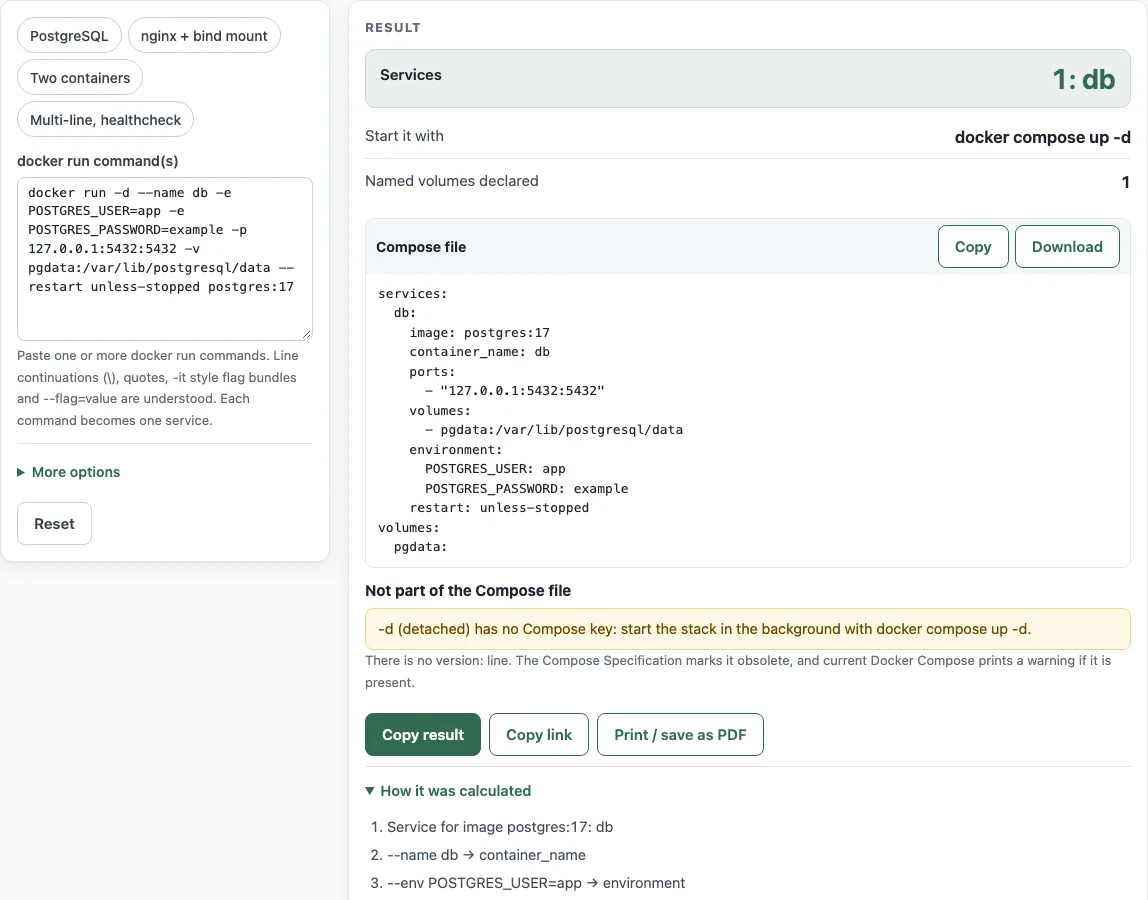
How to use the docker run to Compose converter
- Paste your command into the docker run command(s) box. You can use
docker run,docker container run, or a command starting withsudo. - Read the Compose file code block. It updates as you type.
- Check the result rows. Services shows how many services were created and their names. Start it with shows either
docker compose up -dordocker compose up. Named volumes declared and External networks declared list anything that needs to exist or be declared. - Open How it was calculated to see one line per converted flag, such as
--name db → container_name. - Read Warnings and Not part of the Compose file. These list flags that were skipped and what to use instead.
- Click Copy, or click Download to save the file as
compose.yaml. - Under More options, choose Environment variables as to write environment values as a mapping (
KEY: value) or a list (- KEY=value).
The presets (PostgreSQL, nginx + bind mount, Two containers, Multi-line, healthcheck) load sample commands. They are a quick way to see how a common pattern converts.
Short flags can be bundled the way the Docker CLI allows, so -it is read as -i and -t and becomes stdin_open: true and tty: true. Both --name=db and --name db work, and quotes around values with spaces are removed the way a shell would remove them.
How do I convert docker run to docker compose?
Paste the command into the docker run command(s) box, and the page writes a Compose file in the Compose file code block. Each flag is mapped to a Compose key, and How it was calculated shows the mapping line by line.
Each command becomes one service. The service name is the --name value. Without --name, it is the image name without registry path, tag, or digest.
What happens to -d and –rm?
Neither flag has a Compose key, so neither is written into the file. The page lists them under Not part of the Compose file with what to use instead.
For -d, use docker compose up -d. This is why Start it with shows that command when your original command used -d. For --rm, use docker compose run --rm SERVICE to run a one-off container that is removed when it exits.
Does the file need version:?
No. The output never contains a top-level version: line. The Compose Specification says the version property is only informative and gives a warning that it is obsolete. Leave it out of files you write by hand as well.
How are named volumes handled?
A named volume such as pgdata:/var/lib/postgresql/data stays in the service’s volumes: list. It is also declared in a top-level volumes: section, such as pgdata:, so Compose creates it. Bind mounts with a path do not get a top-level entry.
$(pwd) and $PWD at the start of a path become ., so -v $(pwd)/html:/usr/share/nginx/html:ro becomes ./html:/usr/share/nginx/html:ro. The page warns you when it makes this change.
What about –network?
--network host, none, bridge, and container:X become network_mode. A named network becomes an entry under networks: with top-level external: true. This tells Compose to use a network that already exists, and it returns an error if the network is missing. Create it first with docker network create NAME. The advanced --network name=...,alias=... syntax is not converted.
Can I convert several docker run commands at once?
Yes. Put one command on each line, and each one becomes its own service in the same file. Commands can also be joined with ;, &&, ||, or |, or split with \ line continuations. Lines that are not docker run commands are skipped with a warning. Repeated service names get -2, -3, and so on.
Is my command sent anywhere?
No. The tool runs entirely in your browser and sends nothing anywhere. Your commands stay on your device while you convert them.
Sources (checked 13 October 2026): Docker docs
Worked examples
| Input | Result |
|---|---|
| docker run -d --name db -e POSTGRES_USER=app -e POSTGRES_PASSWORD=e… | 1 service(s): db |
| docker run -d --name web -p 8080:80 -v $(pwd)/html:/usr/share/nginx… | 1 service(s): web |
| docker run -it --rm -e FOO=bar -w /app -v app:/app node:24-alpine n… | 1 service(s): node |
| docker run -d --name db -e POSTGRES_PASSWORD=example postgres:17 | 2 service(s): db, cache |
| docker run --name api --memory 512m --cpus 1.5 --health-cmd "curl -… | 1 service(s): api |
Calculated by the tool above; open it with the same values to see each step.
Frequently asked questions
Which file name should the output use?
Use compose.yaml, which is the preferred name, or compose.yml. Docker Compose also still accepts docker-compose.yaml and docker-compose.yml. The Download button saves the file as compose.yaml.
Why are some values wrapped in quotes?
Ports are always double-quoted, because unquoted values such as 22:22 can be misread as base-60 numbers. Strings that a YAML 1.1 parser would misread, such as no, on, 0755, and ., are also quoted. This keeps the value as you wrote it.
Which flags are not converted?
Flags the converter does not recognize are listed under Warnings. Flags with no Compose key, such as -P, -a, and -q, are listed under Not part of the Compose file. Some flags are recognized but not converted, such as --gpus, --cpu-quota, and --label-file. These also appear in a warning.
How are dollar signs handled?
$VAR and ${VAR} stay in the file, and Compose replaces them with values from your environment when it runs. To write a literal dollar sign, Compose uses $$. A $ inside single quotes in your command becomes $$ in the output.
How do I check the generated file?
Run docker compose config -q in the folder that holds the file. This checks the file without starting any containers. The generated file passed this check in testing with the page’s example outputs, but that does not guarantee it will work for your setup. Test it before you use it.
Related tools
- YAML validator: use it to check that a hand-edited Compose file is valid YAML.
- YAML formatter: use it to tidy indentation and layout in a Compose file.
- Docker Compose example generator: use it to start from a sample Compose file and adapt it.
- Docker Compose commands: use it to look up the commands you need after your services are defined.