Docker Compose Ports
Type your port mappings to check them and get a ports list for your Compose file.
ports: section for a Docker Compose file. It runs in your browser, and nothing you type is sent anywhere. Docker Compose port mapping, also called the compose ports syntax, connects a port on your computer (the host) to a port inside a container. You list each mapping as a short line, and the tool checks it and writes the YAML for you. It also shows what each mapping means in plain words, so you can confirm that traffic goes where you expect. You can write the list in the short form or in the long form with target and published fields, and bind every mapping to 127.0.0.1 in one click.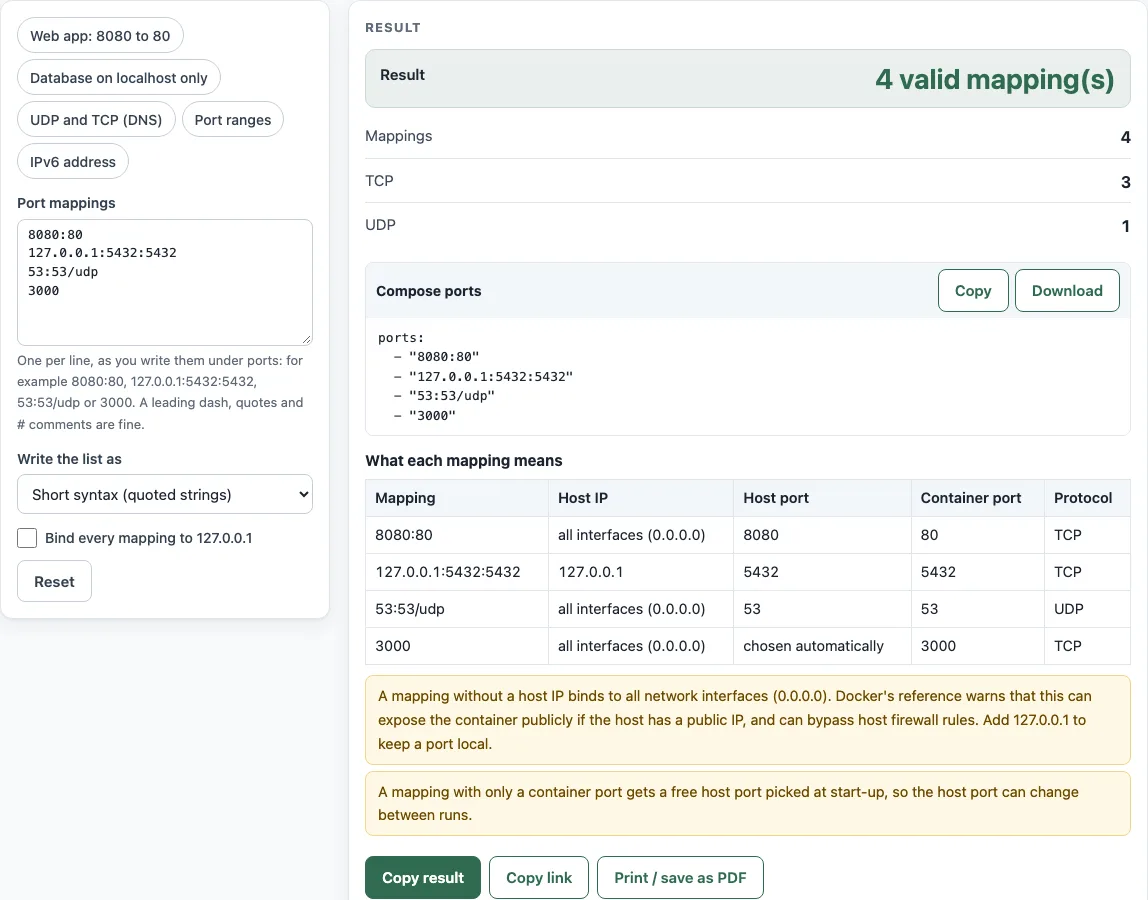
How to use the Docker Compose ports tool
- Type your mappings in the Port mappings box, one per line. A leading dash, quotes and
#comments are accepted. Aports:line is skipped. - Or click a preset chip to load an example: Web app 8080 to 80, Database on localhost only, UDP and TCP (DNS), Port ranges or IPv6 address.
- Under Write the list as, choose Short syntax (quoted strings) or Long syntax (target, published).
- Turn on Bind every mapping to 127.0.0.1 if you want mappings with a host port and no IP to listen only on your own machine.
- Check Result, which shows how many mappings are valid. If a line is wrong, the error names the line number, so fix that line first. Warnings are listed under the result.
- Read Mappings, TCP and UDP to see how the list is grouped.
- Copy the Compose ports code block into your Compose file under the service, or click Download to get a
ports.yamlfile. - Use the What each mapping means table to confirm the host IP, host port, container port and protocol for every line.
The default input contains four mappings, so you can see the output before you change anything. The result recalculates as you type, and Copy link saves your settings in the address.
How do I map a port in Docker Compose?
Add a ports: list under a service and write each entry as a quoted string in the form HOST:CONTAINER. The general short syntax is [HOST:]CONTAINER[/PROTOCOL]. Compose then forwards connections from the host port to the container port while the container runs.
What does 8080:80 mean in Docker Compose?
The first number is the host port, and the second is the container port. So 8080:80 means that a connection to port 8080 on your machine reaches port 80 inside the container. Because no host IP is given, the port listens on all network interfaces over TCP.
How do I publish a port only on localhost?
Put 127.0.0.1 before the host port, for example 127.0.0.1:5432:5432. Only programs on your own machine can then connect. If you leave out the host IP, the port binds to all interfaces (0.0.0.0), which can bypass host firewall rules and expose the container publicly when the host has a public IP.
How do I map a UDP port?
Add /udp after the container port, for example 53:53/udp. Without a suffix, the protocol is TCP, so writing /tcp is optional. A mapping such as 6060:6060/udp works the same way.
What is the difference between ports and expose?
ports publishes a port to the host, so it can be reached from outside the container. expose only makes a port reachable by other services on the same Compose network, and it should not be published to the host. If the image’s Dockerfile already exposes ports, other containers on the network can reach them even without expose.
Why should ports be quoted in YAML?
YAML 1.1 can read a value like 22:22 as a base-60 number, so an unquoted mapping may become the number 1342 instead of text. Quoting the mapping keeps it as a string, which is why the Compose reference says HOST:CONTAINER should always be quoted. The tool writes every mapping in quotes for this reason.
Source (checked 18 October 2026): Docker Compose services reference: ports and expose
Worked examples
| Input | Result |
|---|---|
| 8080:80, 127.0.0.1:5432:5432, 53:53/udp, 3000 | 8080:80 | 127.0.0.1:5432:5432 | 53:53/udp | 3000 |
| 8080:80, 127.0.0.1:5432:5432, 53:53/udp, 3000 | 8080:80 | 127.0.0.1:5432:5432 | 53:53/udp | 3000 |
| 8000-9000:80, 127.0.0.1:5000-5010:5000-5010, [::1]:6001:6001, 6060:6060/udp | 8000-9000:80 | 127.0.0.1:5000-5010:5000-5010 | [::1]:6001:6001 | 6060:6060/udp |
| 8080:80, 127.0.0.1:5432:5432, 53:53/udp, 3000 | 127.0.0.1:8080:80 | 127.0.0.1:5432:5432 | 127.0.0.1:53:53/udp | 3000 |
Calculated by the tool above; open it with the same values to see each step.
Frequently asked questions
What happens if I only write a container port, such as 3000?
The runtime assigns an unused host port automatically, so you do not choose it and it can differ between runs. The table shows such a mapping as “chosen automatically”.
Can I map a range of ports?
Yes. Use a range such as 3000-3005 or 8000-9000:80. The host and container ranges must cover the same number of ports, but a single container port may be mapped from a host range.
Can I use ports together with network_mode: host?
No. Port mapping cannot be used with network_mode: host, and Compose returns a runtime error if you combine them.
Why does the tool say a mapping is invalid?
The tool checks that each port is between 1 and 65535, that a range goes from the lower number to the higher one, that the protocol is tcp or udp, and that an IP address has a host port after it. The message names the line that failed.
Does the tool check whether a port is free on my machine?
No. It only checks the syntax of the mappings and reports two mappings in the list that use the same host port and protocol. It cannot see which ports are in use on your computer.
Does the tool send my mappings to a server?
No. The tool runs entirely in your browser, and nothing is sent anywhere.
Related tools
- Docker Compose example generator — Pick services and get a compose.yaml with an .env file and commands.
- docker run to Compose converter — Turn a docker run command into a compose.yaml service.
- Docker Compose commands — Build a docker compose command and look up the options.
- YAML validator — Check that a whole YAML file parses and see errors with line and column.
- YAML formatter — Re-indent a YAML file, set quote style and keep comments.
- YAML multiline string — Write a multiline text as a YAML block scalar and see the string it gives.
- nginx redirect generator — Build nginx redirect rules for a site or a whole domain.