Crontab Syntax Explained
Paste a crontab (or one line) to see what each line means, with the cron format reference below.
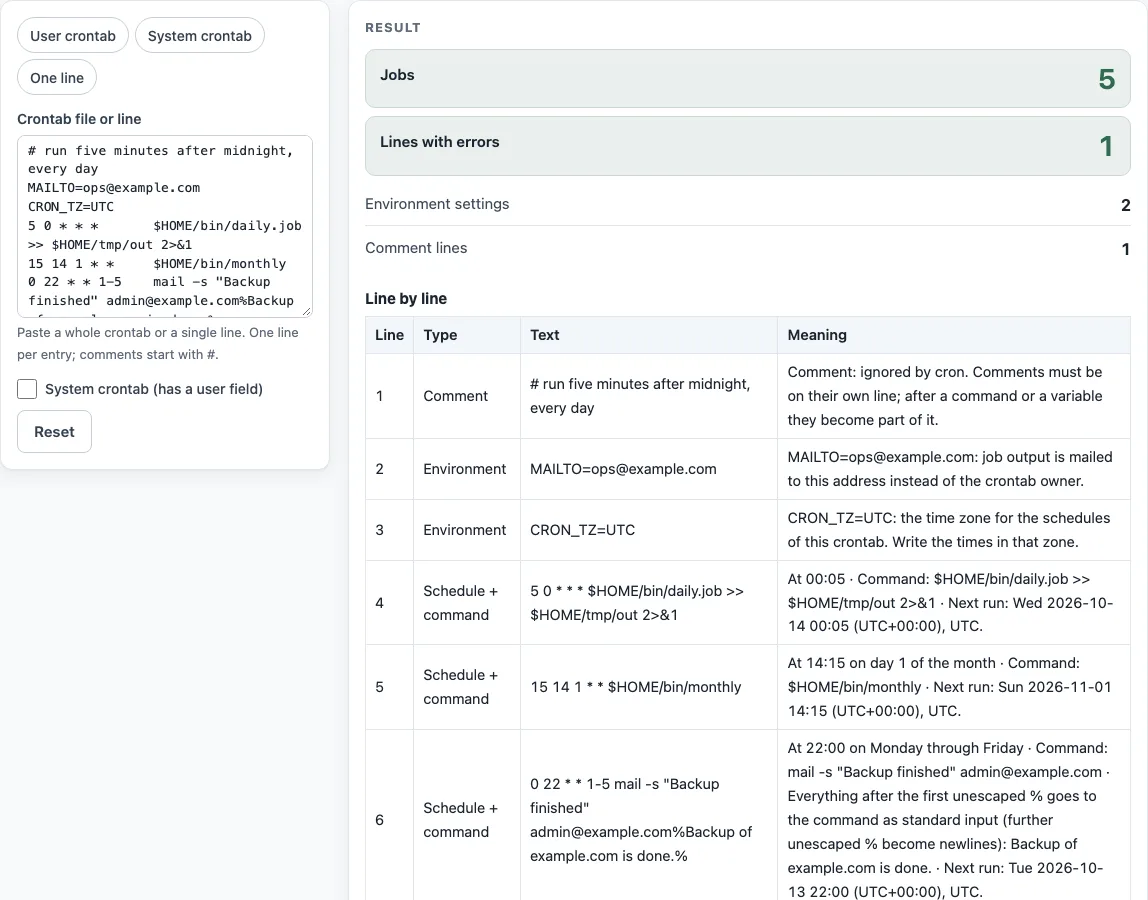
How to use the crontab explainer
- Paste your crontab into the Crontab file or line box. You can paste a whole file or a single line.
- If the text is a system crontab, tick System crontab (has a user field). System crontabs have a user name after the five time fields. Leave the box unticked for a user crontab, because the user name would otherwise be read as part of the command.
- Or choose a preset: User crontab, System crontab, or One line, to see that kind of input.
- Read the Line by line table. Each row shows Line, Type (Comment, Environment, Schedule + command, or Error), Text, and Meaning.
- Check the result rows: Jobs, Lines with errors, Environment settings, and Comment lines.
- For each job, read the “Next run:” time. It is shown in UTC, or in the zone set by a CRON_TZ line above it.
- Use the three reference tables below the line table, The five time fields, Special characters, and Macros (replace the five fields), to check allowed values.
At most 1000 lines are explained, so split very long files. This tool does not check a live server, so test your schedule on your own system before you rely on it.
What is the crontab format?
A crontab line has five time fields followed by a command: minute hour day-of-month month day-of-week command. This is the cron syntax described in crontab(5). The page follows the cronie version of that manual; other cron implementations share the five fields but differ in extras such as CRON_TZ and the @ macros. For example, 30 6 * * 1-5 /usr/local/bin/backup.sh runs the script at 06:30 on weekdays.
The allowed values are 0-59 for minutes, 0-23 for hours, 1-31 for days of the month, 1-12 for months (or the first three letters of the month name, in any case), and 0-7 for days of the week (or the first three letters of the day name). Both 0 and 7 mean Sunday. A crontab line must end with a newline. cron treats a last line without one as broken or partly broken, as noted in crontab(5) CAVEATS.
Lines whose first non-white character is # are comments, and cron ignores them.
What do the five stars mean?
Each * stands for “every” value of its field: every minute, every hour, every day of the month, every month, and every day of the week. So * * * * * runs a job every minute. The other special characters narrow the schedule. A comma (,) lists values, a hyphen (-) gives an inclusive range, and a slash (/) sets a step. */15 * * * * runs every 15 minutes, and 0 22 * * 1-5 runs at 22:00 from Monday to Friday.
When both day-of-month and day-of-week are restricted, crontab(5) says the job runs when either field matches, not when both do. Check this carefully when a job runs on more days than you expected.
Sources (checked 13 October 2026): crontab(5)
Worked examples
| Input | Result |
|---|---|
| 5 0 * * * $HOME/bin/daily.job >> $HOME/tmp/out 2>&1 | At 00:05 · Command: $HOME/bin/daily.job >> $HOME/tmp/out 2>&1 · Next run: Thu 2026-01-01 00:05 (UTC+00:00), UTC. |
| 30 4 1,15 * 5 /usr/bin/report | At 04:30 on days 1 and 15 of the month and also on Friday · Command: /usr/bin/report · Next run: Thu 2026-01-01 04:30 (UTC+00:00), UTC (no CRON_TZ set above, so UTC is shown). |
| * * * * * root touch /tmp/file | Every minute · Runs as user root. · Command: touch /tmp/file · Next run: Thu 2026-01-01 00:01 (UTC+00:00), UTC (no CRON_TZ set above, so UTC is shown). |
| 0 22 * * 1-5 mail -s "Hi" joe@example.com%Hello% | At 22:00 on Monday through Friday · Command: mail -s "Hi" joe@example.com · Everything after the first unescaped % goes to the command as standard input (further unescaped % become newlines): Hello · Next run: Thu 2026-01-01 22:00 (UTC+00:00), UTC (no CRON_TZ set above, so UTC is shown). |
Calculated by the tool above; open it with the same values to see each step.
Frequently asked questions
How do I add a comment?
Start the line with #. A comment cannot follow a command or an environment setting on the same line, because the # would become part of that command.
How do I set the mail address?
Put MAILTO=name@example.com on its own line. Set MAILTO="" to send no mail. If MAILTO is not set, mail goes to the crontab’s owner.
Why does my % break the command?
An unescaped % becomes a newline in the command, and the text after the first % is sent to the command as standard input. To pass a literal percent sign, write \%, as in date +\%Y-\%m-\%d.
How do I set the time zone?
Add CRON_TZ=Zone/Name on a line above the jobs, using an IANA zone name such as Europe/Berlin. Cronie reads this setting. The schedule then uses that zone, and “Next run:” shows it. The log time still uses the zone of the cron daemon.
What are @daily and @reboot?
They are macros that replace the five time fields. @daily is the same as 0 0 * * *, and @hourly is the same as 0 * * * *. @midnight is accepted by cronie as @daily. @reboot runs the job once after the system boots, so it has no five-field equivalent.
What is the user field in /etc/crontab?
The user field names the account the job runs as. It sits between the five time fields and the command, as in * * * * * root touch /tmp/file. User crontabs do not have this field, so tick System crontab (has a user field) when you check /etc/crontab or files in /etc/cron.d.
Related tools
- Cron expression generator: build a five-field schedule by choosing values, then copy the result.
- Cron every 5 minutes: get the exact line for a 5-minute schedule.
- Cron expression tester: check the next run times of a cron expression.
- Cron time zone converter: see when a schedule runs in another time zone.
- Quartz cron expression generator: build Quartz expressions, which use six or seven fields.
- Kubernetes CronJob generator: write a schedule for a Kubernetes CronJob.
- systemd timer generator: create a schedule for a systemd timer instead of cron.