Cron Time Converter
Enter a cron expression and two time zones to get the server's cron expression and both run times.
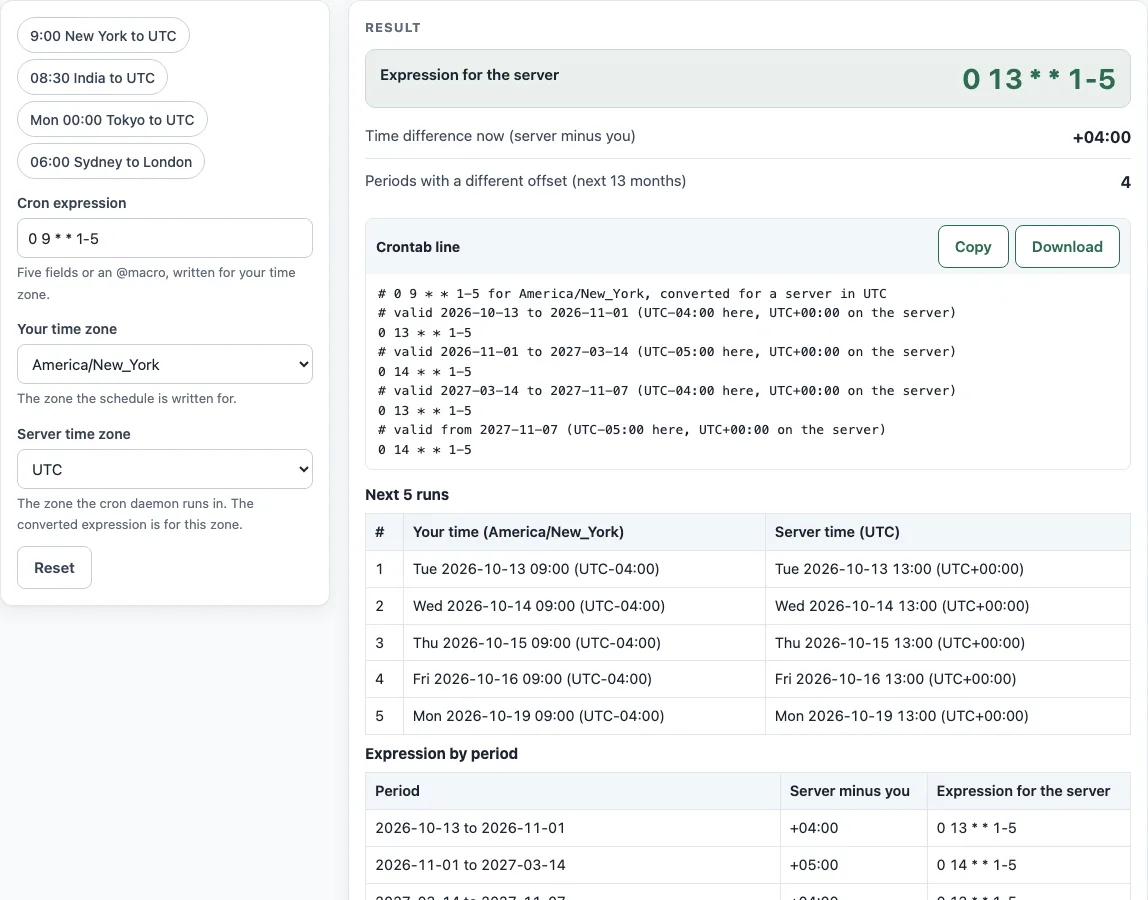
How to use the Cron time converter
- Type your schedule in “Cron expression”. It can have 5 fields or an @macro, and it must be written for your time zone.
- Pick the zone the schedule was written in under “Your time zone”.
- Pick the zone where the cron daemon runs under “Server time zone”.
- Read “Expression for the server”. If it shows “No exact conversion”, the reason is shown with it.
- Check “Time difference now (server minus you)” to confirm the direction of the shift.
- Look at “Periods with a different offset (next 13 months)” and “Expression by period” if the answer changes during the year.
- Use the “Crontab line” code block as your starting point. It has a comment for each period when the answer changes.
- Compare the “Next 5 runs” table, which shows your time and server time side by side, before you rely on the result.
Four presets fill in examples: “9:00 New York to UTC”, “08:30 India to UTC”, “Mon 00:00 Tokyo to UTC” and “06:00 Sydney to London”. The time zone selects list 45 common zones by their IANA names, such as America/New_York and Asia/Kolkata. Every result is checked by simulating both schedules over real dates before it is shown, so a conversion that would not fire at the same moments is never displayed.
How do I convert a cron schedule to UTC?
Pick your zone as the time zone of the expression and UTC as the server time zone, then read “Expression for the server”. The server’s wall-clock time equals your wall-clock time plus the server’s UTC offset minus your UTC offset, so 09:00 in New York (UTC-5 in winter) becomes 14:00 UTC.
Why does the answer change in summer?
Daylight saving time changes the UTC offset of a zone for part of the year. New York moves from UTC-5 to UTC-4, so the difference to UTC shrinks by one hour. “Expression by period” gives one line for each stretch of dates.
Can cron use my local time zone?
Cron normally runs jobs on the server’s clock, so a schedule written for local time must be shifted. In cronie, the CRON_TZ setting specifies the time zone for the crontab, as described in crontab(5). The converter’s warning text names CRON_TZ as an alternative.
What if my time zone has a half-hour offset?
The minutes shift as well as the hours. India is UTC+5:30 with no daylight saving time, so 30 8 * * * becomes 0 3 * * * in UTC. Nepal is UTC+5:45, so 0 9 * * * becomes 15 3 * * *.
Why is there “No exact conversion”?
Some fields cannot be shifted without changing what the schedule means. This happens when the month field is restricted and the times cross midnight, when a day of month would move to day 0 or past day 28, or when the shift would change how day of month and day of week combine (OR versus AND). Tokyo’s 0 1 1 * * (the 1st at 01:00) falls on the last day of the previous month in UTC, so it has no single crontab line.
How do I run at 9 am New York time on a UTC server?
Use 0 14 * * 1-5 while New York is on standard time and 0 13 * * 1-5 during daylight saving time, as the worked example for 2026 shows. The 2026 changes fall on 8 March and 1 November. crontab(5) notes that non-existent times during a change never match and repeated times run twice, so check the job times near those dates.
Sources (checked 13 October 2026): crontab(5)
Worked examples
| Input | Result |
|---|---|
| 0 9 * * 1-5 (America/New_York → UTC) | 0 14 * * 1-5 |
| 30 8 * * * (Asia/Kolkata → UTC) | 0 3 * * * |
| 0 0 * * 1 (Asia/Tokyo → UTC) | 0 15 * * 0 |
| 0 6 * * * (Australia/Sydney → Europe/London) | 0 19 * * * |
Calculated by the tool above; open it with the same values to see each step.
Frequently asked questions
How do I find out which time zone my server uses?
On a Linux server with systemd, timedatectl prints the system time zone, and date shows the current time with its zone abbreviation. Pick that zone as “Server time zone”. Many cloud servers are set to UTC.
Does the converter change anything on my server?
No. It only computes text in your browser and sends nothing anywhere. Copy the “Crontab line” block into your crontab yourself, then compare the first runs with the “Next 5 runs” table.
Why do I get more than one expression?
Because the gap between the two zones is not the same all year. When one zone changes its clocks and the other does not, the converted hour changes too, so the page gives one line per period with its start and end dates. You either update the crontab on those dates or use CRON_TZ instead.
Do New York and Toronto need two expressions?
No. Both change their clocks on the same dates, so the difference between them stays the same and one expression is valid all year. Two lines appear only when the two zones change on different dates, or when only one of them uses daylight saving time.
What does “Time difference now (server minus you)” mean?
It is the server’s UTC offset minus yours at the current moment. For New York to UTC in winter it is +5 hours, so a 09:00 job in New York becomes 14:00 on the server.
Related tools
- Cron expression generator - Build a cron expression from fields before you convert its time zone.
- Cron expression tester - Check when an expression fires before you move it to another zone.
- Crontab syntax explainer - Review what each of the five fields means in crontab(5).
- Cron every 5 minutes - Get a ready-made interval schedule that does not depend on a time zone.
- Quartz cron expression generator - Write a schedule for Quartz, which uses a different field layout.
- Kubernetes CronJob generator - Create a CronJob schedule once you know the server-side time.
- systemd timer generator - Build a timer for systemd when you do not use cron.