Cron Expression Tester
Paste a cron expression or a crontab line to check it, explain it and list its next runs.
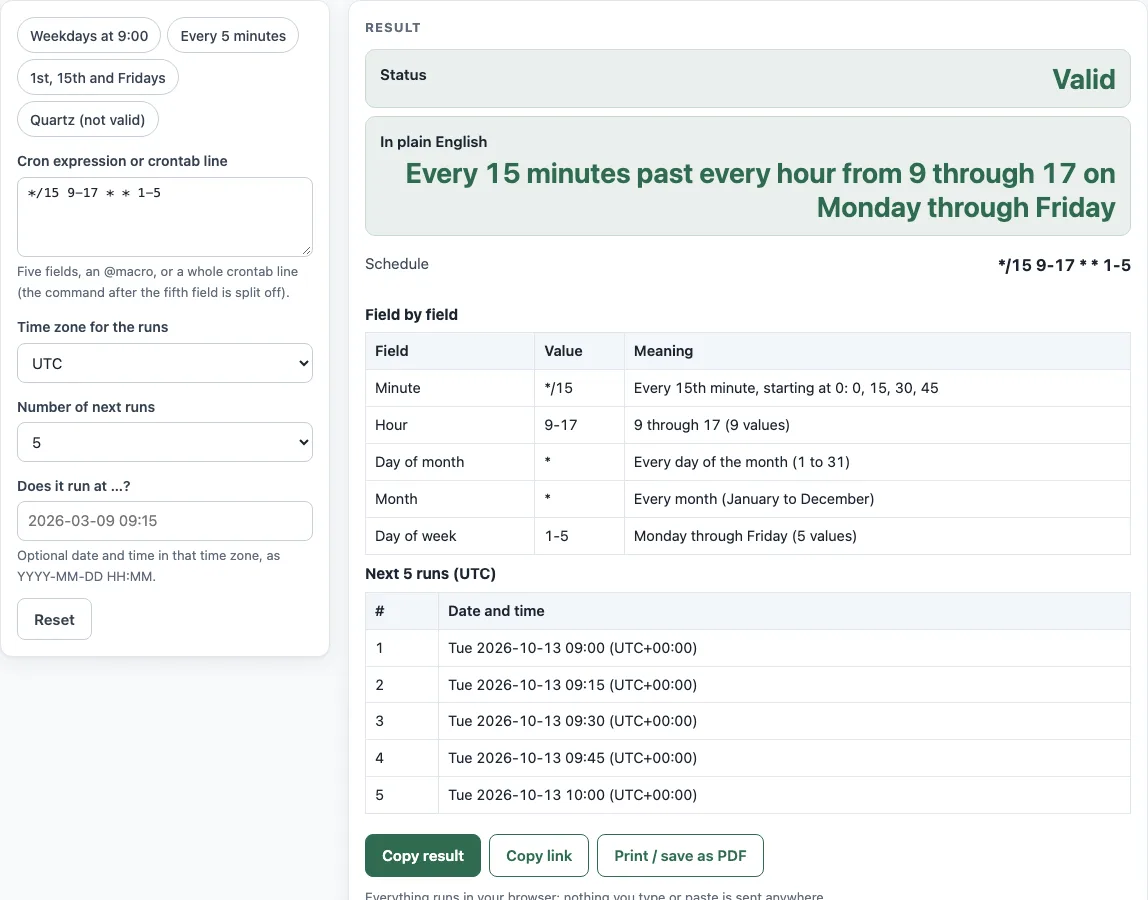
How to use the Cron expression tester
- Paste your expression into “Cron expression or crontab line”. To try an example first, pick a preset: “Weekdays at 9:00”, “Every 5 minutes”, “1st, 15th and Fridays”, or “Quartz (not valid)”.
- Read “Status”. If it says Invalid, the “Problem” row gives the exact reason, naming the field and the token.
- If it is Valid, read “In plain English”, “Schedule”, and “Command”.
- Read the “Field by field” table (Field, Value, Meaning) to check what each field does.
- Choose a “Time zone for the runs”. The default is UTC.
- Choose a “Number of next runs” value: 5, 10, or 20. Then read the “Next 5 runs (UTC)” table.
- To check a specific moment, type a date and time as YYYY-MM-DD HH:MM in “Does it run at …?”. The “Run check” row answers as soon as you finish typing.
Only the first line that is not blank and not a comment is read, so paste one schedule at a time. Every result updates as you type, so you can fix a field and watch “Status” change from Invalid to Valid. “Copy link” puts the expression and your settings in the page address, which is handy when you want a colleague to look at the same schedule, and “Print / save as PDF” keeps a record of the explanation next to the change you are making.
Is my cron expression valid?
A cron expression is valid when it has five fields in standard crontab form and every value falls inside its allowed range. The allowed ranges are minute 0-59, hour 0-23, day of month 1-31, month 1-12 or jan-dec, and day of week 0-7 or sun-sat. Names are case-insensitive, so mon, wed, fri, and jan-mar are all valid.
If a value is out of range, the tool names it. For example, 0 24 * * * gives “Hour: 24 is outside the allowed range 0-23 (in “24”).”
What does this cron expression mean?
The “In plain English” row gives a short sentence, and the “Field by field” table explains each field separately. For example, */15 9-17 * * 1-5 reads “Every 15 minutes past every hour from 9 through 17 on Monday through Friday.”
When both the day of month and day of week are restricted, the command runs when either one matches. In 30 4 1,15 * 5, the command runs at 04:30 on the 1st and 15th, and also on every Friday. When a day field starts with *, both day fields must match instead (cronie cron.c).
When will it run next?
The “Next 5 runs (UTC)” table lists the upcoming run times. Use “Number of next runs” to show 10 or 20 instead, and “Time zone for the runs” to see the times in another zone.
Starting from Thursday 2026-01-01 00:00 UTC, */15 9-17 * * 1-5 next runs at 09:00, 09:15, 09:30, 09:45, and 10:00 on 2026-01-01. If a schedule has no run in the next 9 years, the tool shows a warning.
Why does 5/15 fail?
A step needs a range or * in front of the slash. The tool reports “Minute: a step needs a range or *” because cronie’s crontab parser (entry.c) only accepts a step after * or after a range, so the line would be rejected when the crontab is loaded.
Write 5-59/15 to start at minute 5 and run every 15 minutes, or write */15 to run every 15 minutes from the start of the hour.
Why is 0 0 12 * * ? invalid?
That line has six fields, so the tool reads it as a Quartz (seconds) expression. The first field is seconds, and ? is Quartz-only syntax. The tool also treats L, W, and # as Quartz-only. A standard crontab does not accept any of them, so the “Quartz (not valid)” preset also shows Invalid here.
What happens at daylight saving changes?
Times that are skipped when clocks go forward never run, and times repeated when clocks go back run twice (crontab(5)). Use “Does it run at …?” to check a specific case. For 30 2 * * * in America/New_York at 2026-03-08 02:30, the answer is “does not exist”, because clocks jump from 02:00 to 03:00. For 30 1 * * * at 2026-11-01 01:30, the answer is “Yes, twice”.
Sources (checked 13 October 2026): crontab(5) · Quartz docs
Worked examples
| Input | Result |
|---|---|
| */15 9-17 * * 1-5 | Every 15 minutes past every hour from 9 through 17 on Monday through Friday |
| 0 0 * * 0 | At 00:00 on Sunday |
| 30 4 1,15 * 5 | At 04:30 on days 1 and 15 of the month and also on Friday |
| */5 * * * * /usr/local/bin/sync.sh | Every 5 minutes |
| 0 0 12 * * ? | Invalid: This has 6 fields. It looks like a Quartz-style cron expression (seconds first, optional year last), which a standard crontab does not accept. A standard crontab schedule has 5 fields: minute, hour, day of month, month, day of week. |
Calculated by the tool above; open it with the same values to see each step.
Frequently asked questions
Can I paste a full crontab line?
Yes. Paste a line such as 30 4 1,15 * 5 /usr/bin/report. The tool separates the five time fields into “Schedule” and shows the rest, /usr/bin/report, under “Command”.
Does it run at a given time?
Enter the date and time as YYYY-MM-DD HH:MM in the zone you chose. The “Run check” row then answers Yes, Yes twice, No with the next run, “does not exist”, or a format hint.
What does @reboot mean?
@reboot is a valid macro. It has no fixed run times, so the “Next 5 runs (UTC)” table has no rows for it. It runs once when the machine starts.
Why does the tool reject ~ in a range?
Ranges written with ~ are “random” ranges. Cronie chooses the actual value when it reads the file, so the tool rejects them.
What does 0 0 * * * mean in the tester?
It is valid and means every day at 00:00. The “Field by field” table shows minute 0, hour 0 and * (every value) for day of month, month and day of week, and the next runs are midnight on each of the next days in the zone you picked.
Does the tool send my expression anywhere?
No. The tool runs entirely in your browser and sends nothing anywhere. It is free and needs no sign-up.
Related tools
- Cron expression generator — Build a schedule from dropdowns when you do not yet have an expression to test.
- Cron every 5 minutes — Copy a ready-made every-5-minutes schedule and check its run times.
- Crontab syntax explainer — Learn what each field and symbol means before you write your own expression.
- Cron time zone converter — Convert a schedule’s run times from one time zone to another.
- Quartz cron expression generator — Create a Quartz expression with a seconds field when your scheduler uses Quartz syntax.
- Kubernetes CronJob generator — Turn a schedule into a CronJob manifest for a Kubernetes cluster.
- systemd timer generator — Create a systemd timer as an alternative to a cron schedule.