Cron Every 5 Minutes
Choose an interval to get the cron expression, its next run times and a list of common schedules.
*/5 * * * *, which runs the command at minutes 0, 5, 10 and so on through 55 of every hour. This every-N cron generator builds that line for you, along with any other “every N” schedule, so you can paste it into a crontab. Enter 5 as the value and minutes as the unit, and the tool shows the cron expression, a plain-English description, a ready-to-use crontab line and the next five run times. Whether you need a cron schedule for every 5 minutes on a Unix-like server or a cron task every 5 minutes for a personal project, the output uses the same standard five-field format. The tool runs entirely in your browser, sends nothing anywhere, and is free with no sign-up.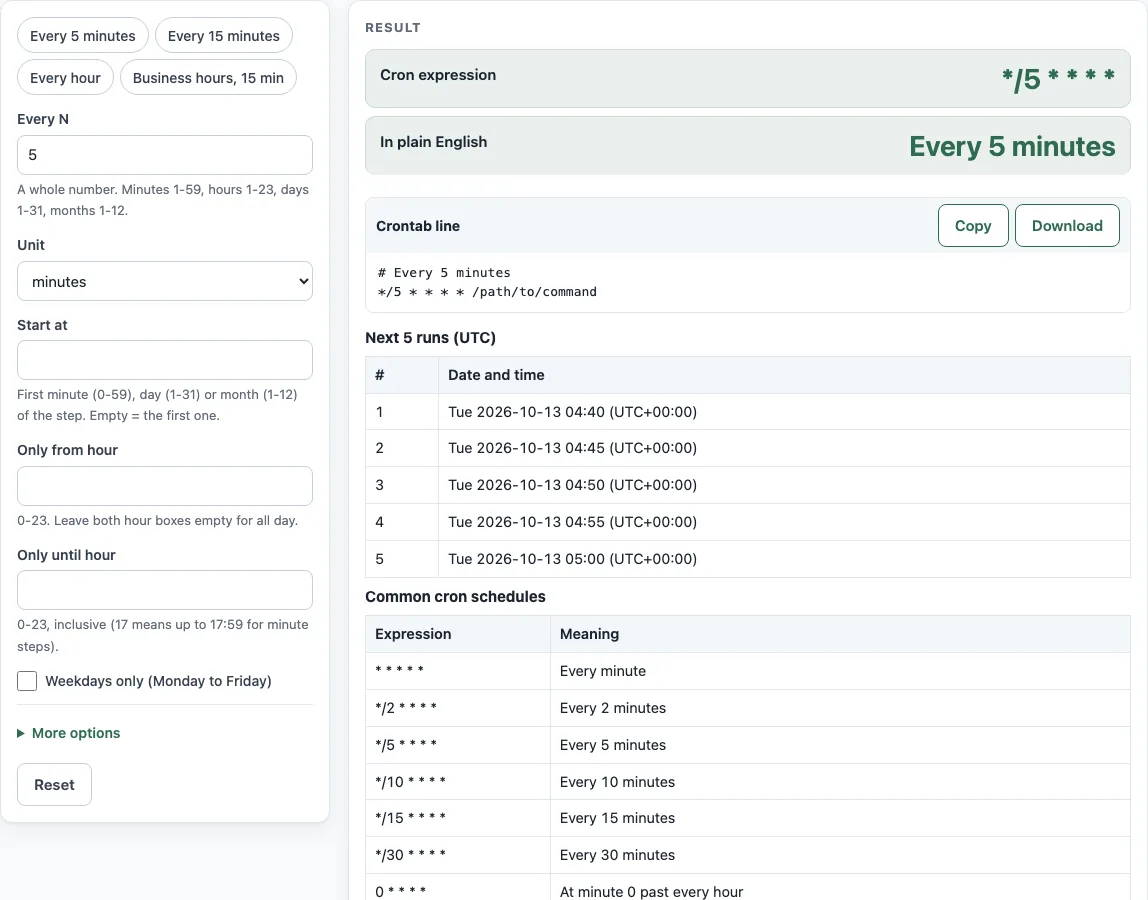
How to use the every-N cron generator
- Enter Every N as 5.
- Set Unit to minutes.
- Optional: tick Weekdays only (Monday to Friday), or set Only from hour and Only until hour to limit runs to a time window.
- Read the Cron expression output. For a plain 5-minute schedule it shows
*/5 * * * *. - Check In plain English to confirm the description matches what you want.
- Copy the Crontab line code block, or download
crontab.txt, and add the line to your crontab. - Check Next 5 runs (UTC) to see the actual times. To see them in another time zone, change Show next runs in, which is under More options.
To skip steps 1 and 2, click the Every 5 minutes preset. The Every 15 minutes and Business hours, 15 min presets work the same way for those schedules.
Use Start at to move the first run away from minute 0. With 5 minutes and a start of 2 the generator writes 2-59/5 * * * *, which runs at minutes 2, 7, 12 and so on up to 57. Spreading jobs this way keeps several five-minute jobs on one server from all starting in the same minute. For the hours, days and months units, At minute, At hour and On day of the month set the time of day the job runs, so “every 6 hours” can run at 00:30, 06:30, 12:30 and 18:30 instead of on the hour.
How do I run a cron job every 5 minutes?
A cron expression has five fields in this order: minute, hour, day of month, month and day of week. The expression */5 * * * * places */5 in the minute field, which means every fifth value counted from the start of that field: 0, 5, 10 up to 55. The other four fields are *, meaning every value, so the job runs at those minutes in every hour of every day. The field rules are described in crontab(5).
A step only counts within its own field. It does not carry over into the next hour or day. Because 60 divides evenly by 5, the gap is always five minutes, including across the top of the hour. The generator accepts minute values from 1 to 59 and rejects 60, since 60 would mean once an hour.
Does every 5 days work the same way?
Not quite. With Unit set to days, 5 gives 0 0 */5 * *, which runs on days 1, 6, 11, 16, 21, 26 and 31 of each month. The step restarts on the 1st of every month, so after the 31st the next run comes one day later, not five. The generator prints that warning with the real day numbers for the step you choose.
Does */7 mean exactly every 7 minutes?
No. The minute field */7 runs at 0, 7, 14, 21, 28, 35, 42, 49 and 56, then at minute 0 of the next hour. Because 60 does not divide evenly by 7, the gap from 56 to 60 is 4 minutes instead of 7, and the pattern restarts every hour. The generator shows a warning with these real numbers when a step does not divide its range evenly.
Cron has no expression for intervals such as “every 90 minutes” or “every 45 minutes across hours”. For those, use a wrapper script or a systemd timer, as described in systemd.timer(5). Before you rely on any generated line, run it as a test job and check the output, because the generator does not test your server.
Sources (checked 13 October 2026): crontab(5) · systemd.timer(5)
Worked examples
| Input | Result |
|---|---|
| Every 5 minutes | */5 * * * * – Every 5 minutes |
| Every 15 minutes | */15 * * * * – Every 15 minutes |
| Every 7 minutes | */7 * * * * – Every 7 minutes |
| Every 15 minutes | */15 9-17 * * 1-5 – Every 15 minutes past every hour from 9 through 17 on Monday through Friday |
| Every 6 hours | 0 */6 * * * – At minute 0 past every 6th hour |
Calculated by the tool above; open it with the same values to see each step.
Frequently asked questions
Can cron run every 10 seconds?
No. The smallest step in cron is one minute, so the shortest interval is * * * * *. For shorter intervals, use a script that loops and sleeps between runs, or a systemd timer.
How do I run a cron job every minute?
Use * * * * *, which runs at every minute of every hour. In the generator, set Every N to 1 and Unit to minutes, and it produces that expression.
How do I run a cron job every 15 minutes?
Use */15 * * * *, which runs at minutes 0, 15, 30 and 45 of every hour. Enter 15 as Every N with minutes as the Unit, or click the Every 15 minutes preset.
What does 0 0 * * * mean?
It means every day at midnight: minute 0 of hour 0, on every day of the month, in every month and on every day of the week. It is the “daily at midnight” entry in the Common cron schedules table.
How do I run only on weekdays or in business hours?
Tick Weekdays only (Monday to Friday) and set Only from hour and Only until hour. For example, every 15 minutes from 09:00 to 17:45 on weekdays gives */15 9-17 * * 1-5. The generator refuses weekdays-only together with a start day or a fixed day of the month, because cron would then run the job when either condition matched.
How do I run every 2 hours or every 6 hours?
Set Unit to hours and Every N to 2 or 6. This produces 0 */2 * * * or 0 */6 * * *, which run at minute 0 of hours 0, 2, 4 and so on, or of hours 0, 6, 12 and 18.
Related tools
- Cron expression generator — Build any “every N” schedule and get the crontab line and next runs.
- Cron expression tester — Check what an existing expression will do before you use it.
- Crontab syntax explainer — Learn what each of the five fields and special characters means.
- Cron time zone converter — Work out how a schedule’s times line up across time zones.
- Quartz cron expression generator — Create expressions for Quartz scheduler, which uses a different format.
- Kubernetes CronJob generator — Turn a schedule into a CronJob manifest for Kubernetes.
- systemd timer generator — Create a systemd timer when you need intervals cron cannot express.