Cron Expression Generator
Pick minutes, hours, days and months to build a cron expression, then copy the crontab line.
Popular tools
crontab.txt. The tool runs entirely in your browser and sends nothing anywhere. It is free and needs no sign-up. Think of it as a cron expression maker that also shows its work: use it whether you are setting up a cronjob, planning a cron schedule for a script, or writing a crontab entry for a Linux server.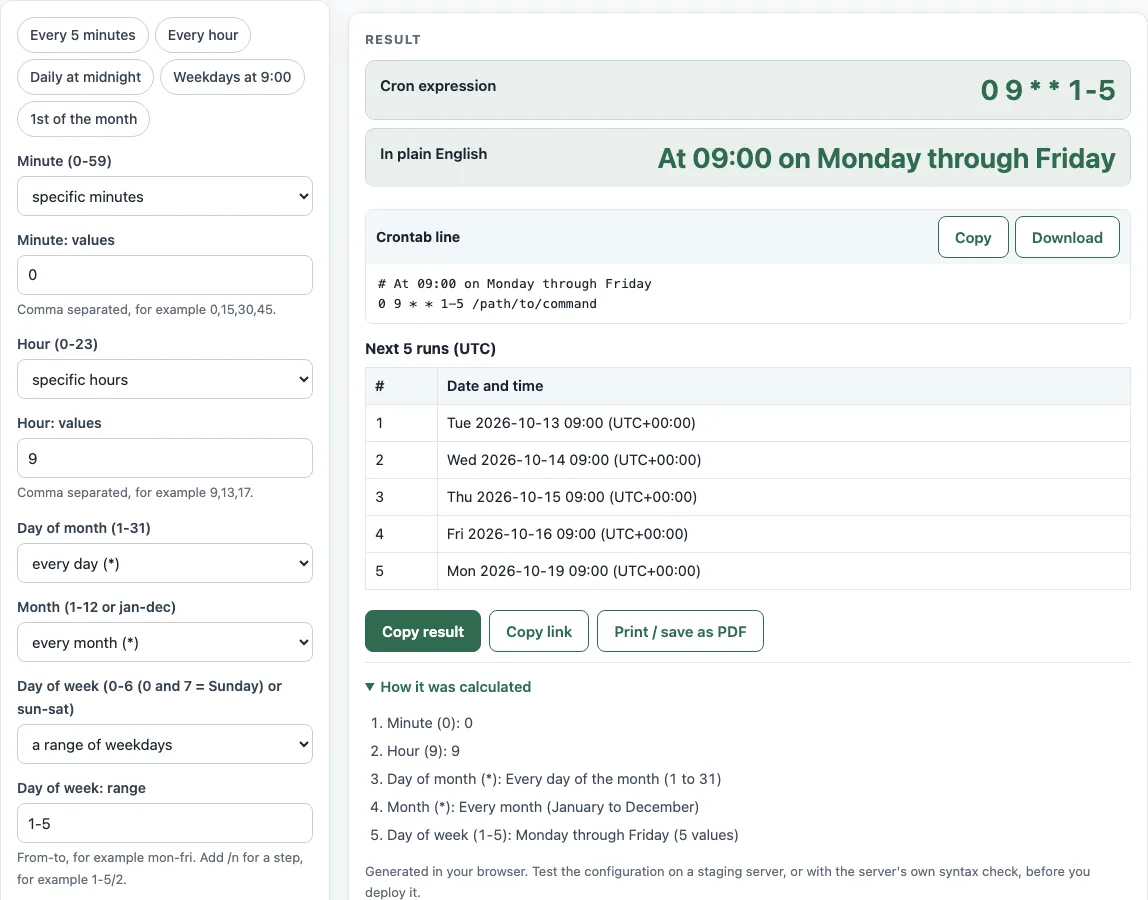
How to use the Cron expression generator
- For the Minute (0-59) field, open the select and pick a mode: every (
*), every N (*/N), specific values (a comma list), or a range (a-b, optionallya-b/n). - Type the number or numbers that the chosen mode needs. Only the matching input is shown, such as Minute: every N or Minute: range.
- Repeat step 2 for Hour (0-23), Day of month (1-31), Month (1-12 or jan-dec), and Day of week (0-6 (0 and 7 = Sunday) or sun-sat).
- Optionally, type a job in Command (optional). If you leave it empty, the crontab line uses the placeholder
/path/to/command. - Open Show next runs in and choose a time zone. It defaults to UTC.
- Read the Cron expression and In plain English outputs, then check the Next 5 runs (UTC) table.
- Copy the Crontab line block, or download it as
crontab.txt.
You can also start from a preset chip: Every 5 minutes, Every hour, Daily at midnight, Weekdays at 9:00, or 1st of the month. Then adjust any field. Errors name the field that caused them, so you can fix that one input.
Every change updates the result at once, so the page works as a cron expression builder and a crontab creator in one: generate the cron expression, read it back in plain English, and confirm the dates in the table before you generate the crontab line. Copy link keeps your settings in the page address, so a teammate can open the same schedule.
What is a cron job?
A cron job is a task that runs automatically at times you set, without anyone starting it by hand. The cron scheduler keeps a list of these jobs and starts each one when its schedule matches the current time. Cron jobs are common for backups, log cleanup, and sync scripts.
What is a cron job in Linux?
On Linux, a cron job is an entry in a crontab, which is a table of schedules and commands for one user or the system. The cron daemon reads these files and runs each command at the matching times. The format is described in the crontab(5) manual page; this page follows the cronie version of it, including the @ macros and CRON_TZ.
What is a cron expression?
A cron expression is the schedule part of a crontab line. It has five space-separated fields: minute, hour, day of month, month, and day of week. Each field accepts allowed values, * for every value, lists with commas, ranges with a hyphen, and steps with /n.
How do I run a cron job every 5 minutes?
Set the minute field to “every N” with 5. That produces */5 * * * *, which means minute 0, 5, 10, and so on up to 55, in every hour of every day. The other four fields stay on “every” (*).
How do I run a cron job at 9 am on weekdays?
Set minute to 0, hour to 9, day of month and month to every, and day of week to the range 1-5. That gives 0 9 * * 1-5, which runs at 09:00 from Monday through Friday. This is also the default state of the tool.
What does 0 0 * * * mean?
It means every day at 00:00, which is midnight, in the server’s time zone. The first field is the minute (0), the second is the hour (0), and the three * fields mean every day of the month, every month, and every day of the week. The @daily macro is a shorter way to write the same schedule.
What does */5 mean?
*/5 means every 5th value of that field, counted from the start of the field’s allowed range. In the minute field it means 0, 5, 10, and so on to 55. The step is evaluated inside its own field, so */23 in the hour field means hours 0 and 23 only.
How do I add a command?
Type the command in the Command (optional) input, such as /usr/local/bin/sync.sh. The page adds it after the expression in the Crontab line block, for example */5 * * * * /usr/local/bin/sync.sh. Use the full path to the program, because cron runs with a minimal environment.
What if I set both day of month and day of week?
When both fields are restricted, cron runs the job if either one matches. For example, 30 4 1,15 * 5 runs at 04:30 on the 1st and 15th of each month and also every Friday (crontab(5)). There is one exception: if either field starts with *, cron requires both to match. So 0 0 */2 * 1 runs only on odd days that are also Mondays.
Which time zone does cron use?
Cron uses the time zone of the server, or the CRON_TZ value set in the crontab, as described in crontab(5). The Show next runs in select only changes the Next 5 runs table. It does not change the expression or the crontab line. Daylight saving time also matters: a time that does not exist never runs, and a time that happens twice runs twice, and the table accounts for this.
Sources (checked 13 October 2026): crontab(5)
Worked examples
| Input | Result |
|---|---|
| Minute: 0, Hour: 9, Day of week: 1-5 | 0 9 * * 1-5 – At 09:00 on Monday through Friday |
| Minute: */5 | */5 * * * * – Every 5 minutes |
| Minute: 0, Hour: 0, Day of month: 1 | 0 0 1 * * – At 00:00 on day 1 of the month |
| Minute: 30, Hour: */6 | 30 */6 * * * – At minute 30 past every 6th hour |
| Minute: 15, Hour: 4, Day of week: sun | 15 4 * * sun – At 04:15 on Sunday |
Calculated by the tool above; open it with the same values to see each step.
Frequently asked questions
Does this cron expression generator support seconds or a year field?
No. It makes standard 5-field crontab expressions only. A 6- or 7-field expression, with seconds first and an optional year, is Quartz syntax and is not a standard crontab format.
Does the tool check or run my cron job?
No. The tool builds the text in your browser and does not connect to your server. Before you rely on a schedule, test the crontab line on your system, for example with a short job that writes to a log file.
What do @daily and @hourly mean?
These are macros that replace the five fields. @daily is the same as 0 0 * * *, and @hourly is the same as 0 * * * *. Other macros include @weekly, @monthly, @yearly, and @reboot, which runs once after the system boots.
Can I use names such as mon or jan in the expression?
Yes. Month and day of week fields accept three-letter names, such as jan-dec or sun-sat, and the matching is case-insensitive. Ranges and lists of names are allowed too.
Why does the warning say there is no date in the next 9 years?
The schedule can never match, for example because it asks for 31 February. Change the day of month or month so that a real date exists, then check the Next 5 runs (UTC) table again.
Why are my next runs different from the times on my server?
The table uses the time zone you choose in Show next runs in, which defaults to UTC. Your server runs cron in its own time zone, unless the crontab sets CRON_TZ. Match the select to your server’s zone to compare times.
How do I install the crontab line?
Save the Crontab line block, or the downloaded crontab.txt, and add the line to your crontab using the crontab command on your system. Then list your entries to confirm that the line is there.
Related tools
- Cron every 5 minutes: Use this when you only need the
*/5schedule and its explanation. - Cron expression tester: Use this to check whether an existing expression runs when you expect.
- Crontab syntax explainer: Use this to learn what each field and symbol means before you write your own.
- Cron time zone converter: Use this to convert a schedule between time zones.
- Quartz cron expression generator: Use this when your scheduler expects seconds and a year field.
- Kubernetes CronJob generator: Use this to put a schedule into a Kubernetes CronJob.
- systemd timer generator: Use this when you want a systemd timer instead of a crontab entry.
- Windows Task Scheduler cron equivalent: Use this to turn a cron expression into schtasks commands for Windows.